

The browser's downloads, in VDM
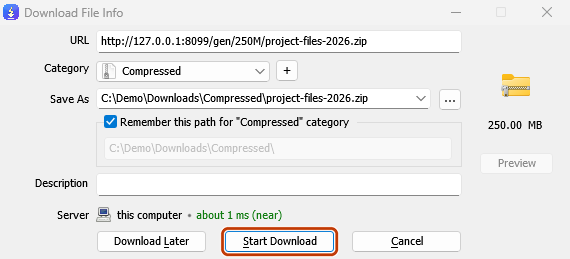
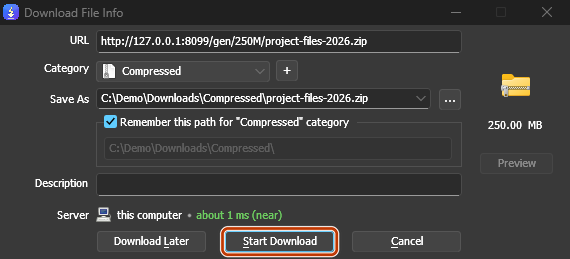
Click a download link and Download File Info opens in VDM instead of the browser's own download bar. VDM gets the address together with the page it came from, your cookies for the site and the browser's User-Agent, so a download that needs you to be signed in still works. The browser's copy is cancelled and taken off its download list.
You decide what VDM takes. Options → File types lists the file types it catches (ZIP, RAR, EXE, ISO, MP4, PDF and many more) and the sites it leaves alone, and Options → General has the browsers it takes downloads from. Everything else stays with the browser.
VDM doesn't need to be running first: the browser starts it. If VDM can't be reached at all, the download stays with the browser, so nothing is lost.
Botão direito, ou o botão sobre um vídeo
Right-click a link, a picture, a video or a sound and choose Download with Mister Download Manager: VDM downloads it whatever its type.
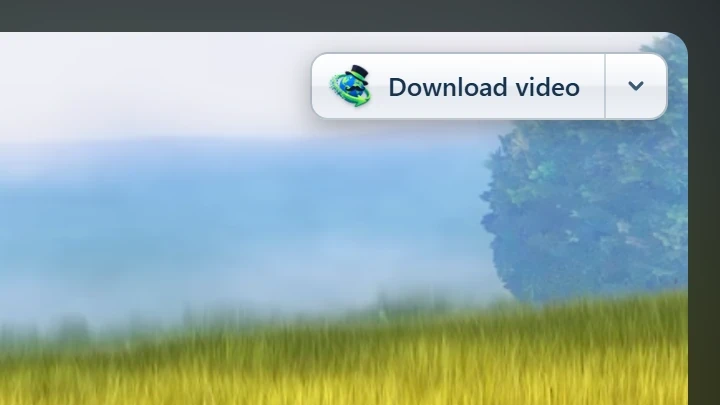
Point at a video and a small Download video button appears at its edge. It opens VDM's Download video from a page window with the qualities on offer (see video downloads). On many pages it finds the video before it plays, from the stream address the page wrote for its player. You can hide it on one video or one site, or turn it off in Options.
Todas as imagens de uma página
To save a whole gallery, open the toolbar button's This page tab and click Find images. The extension finds each picture the page shows at the largest size the page lists for it, the ones it loads only as you scroll, and links that go straight to a picture, each once. Leave out icons and thumbnails with a smallest width and height, and any type you don't want (JPEG, PNG, WebP, GIF, AVIF...), then Send to Link grabber: VDM looks each one up for its name and size, and you tick there the ones to download. Nothing is looked for until you click.
Clique com o botão direito em uma página para Baixar todos os links (ou em uma seleção para Baixar links selecionados) e as imagens nela virão junto: o Link grabber as mantém fora do caminho em Ocultar imagens localizadas nesta página da web. Desmarque para selecioná-las com os links da página.
Instalado da loja, mantido atualizado
Install VDM with its setup and keep Set up browser integration ticked. Then add the extension: Firefox 140 or later takes it from addons.mozilla.org, and Chrome, Edge, Brave, Opera and Vivaldi from the Chrome Web Store. The browser keeps it updated.
Algumas limitações, claramente: a cópia portátil não consegue se conectar a um navegador, já que não grava nada fora da sua pasta.
Mais do navegador, na versão 0.5.0
- The toolbar button says whether the browser reaches VDM, and How to fix it opens the help for the reason. When a setting leaves a download to the browser (its type isn't in File types, its site is excluded, it's under the minimum size), the button names the setting and the file, and VDM's log keeps a line for each.
- Mídia nesta página lista os streams de vídeo e os arquivos de vídeo e áudio que uma página carregou, para que um vídeo sem link ainda possa ser salvo. Streams protegidos por direitos autorais são listados como Protegido e nunca são enviados.
- Baixar todos os links e Baixar links selecionados enviam os links de uma página para o Link grabber.
- PDFs, music and videos the browser would open itself, and downloads from forms, go to VDM too. Hold Alt while clicking to let the browser have one.
- Browsers built on Firefox or Chromium, such as Zen, LibreWolf, Floorp, Waterfox and Helium, reach VDM. Flatpak browsers on Linux can't start VDM's helper.
- Test browser integration... in Options → General checks VDM's side.
Gratuito, de código aberto, sem anúncios, sem período de teste.
Download Volt Download Manager