

- Startseite
- Funktionen
- Browser-Erweiterung
Click a download. VDM takes it from there.
The free VDM extension hands each download you click over to VDM, with the page it came from and your sign-in for the site. A button over videos sends them to VDM too.
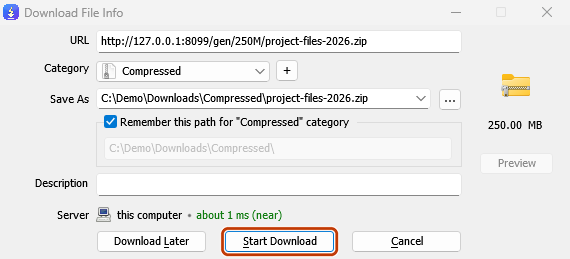
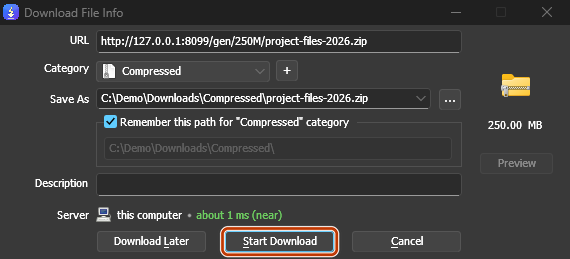
The browser's downloads, in VDM
Click a download link and Download File Info opens in VDM instead of the browser's own download bar. VDM gets the address together with the page it came from, your cookies for the site and the browser's User-Agent, so a download that needs you to be signed in still works. The browser's copy is cancelled and taken off its download list.
You decide what VDM takes. Options → File types lists the file types it catches (ZIP, RAR, EXE, ISO, MP4, PDF and many more) and the sites it leaves alone, and Options → General has the browsers it takes downloads from. Everything else stays with the browser.
VDM doesn't need to be running first: the browser starts it. If VDM can't be reached at all, the download stays with the browser, so nothing is lost.
Rechtsklick oder die Schaltfläche über einem Video
Right-click a link, a picture, a video or a sound and choose Download with Mister Download Manager: VDM downloads it whatever its type.
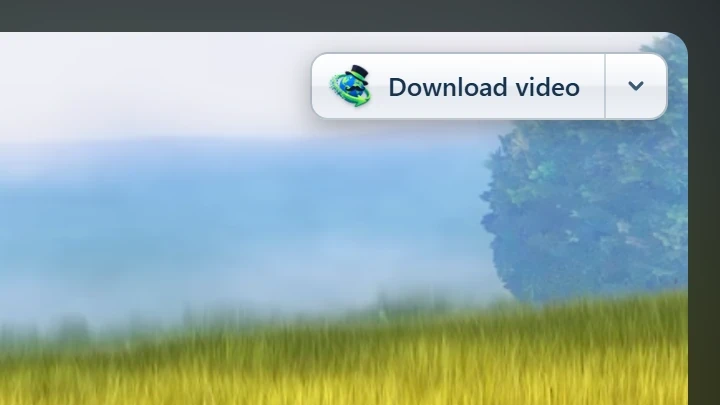
Point at a video and a small Download video button appears at its edge. It opens VDM's Download video from a page window with the qualities on offer (see video downloads). On many pages it finds the video before it plays, from the stream address the page wrote for its player. You can hide it on one video or one site, or turn it off in Options.
Alle Bilder einer Seite
To save a whole gallery, open the toolbar button's This page tab and click Find images. The extension finds each picture the page shows at the largest size the page lists for it, the ones it loads only as you scroll, and links that go straight to a picture, each once. Leave out icons and thumbnails with a smallest width and height, and any type you don't want (JPEG, PNG, WebP, GIF, AVIF...), then Send to Link grabber: VDM looks each one up for its name and size, and you tick there the ones to download. Nothing is looked for until you click.
Klicken Sie mit der rechten Maustaste auf eine Seite für Alle Links herunterladen (oder auf eine Auswahl für Ausgewählte Links herunterladen), und die Bilder auf der Seite werden mit einbezogen: Der Link-Grabber hält sie unter Auf dieser Webseite befindliche Bilder ausblenden verborgen. Deaktivieren Sie diese Option, um sie zusammen mit den Links der Seite auszuwählen.
Aus dem Store installiert, aktuell gehalten
Install VDM with its setup and keep Set up browser integration ticked. Then add the extension: Firefox 140 or later takes it from addons.mozilla.org, and Chrome, Edge, Brave, Opera and Vivaldi from the Chrome Web Store. The browser keeps it updated.
Einige Einschränkungen, ganz klar: Die portable Version kann keine Verbindung zu einem Browser herstellen, da sie nichts außerhalb ihres Ordners schreibt.
Mehr vom Browser, in Version 0.5.0
- The toolbar button says whether the browser reaches VDM, and How to fix it opens the help for the reason. When a setting leaves a download to the browser (its type isn't in File types, its site is excluded, it's under the minimum size), the button names the setting and the file, and VDM's log keeps a line for each.
- Medien auf dieser Seite listet die Videostreams sowie die Video- und Audiodateien auf, die eine Seite geladen hat, sodass ein Video ohne Link trotzdem gespeichert werden kann. Kopiergeschützte Streams werden als Geschützt aufgeführt und niemals gesendet.
- Alle Links herunterladen und Ausgewählte Links herunterladen senden die Links einer Seite an den Link-Grabber.
- PDFs, music and videos the browser would open itself, and downloads from forms, go to VDM too. Hold Alt while clicking to let the browser have one.
- Browsers built on Firefox or Chromium, such as Zen, LibreWolf, Floorp, Waterfox and Helium, reach VDM. Flatpak browsers on Linux can't start VDM's helper.
- Test browser integration... in Options → General checks VDM's side.
Kostenlos, Open Source, keine Werbung, keine Testversion.
Download Volt Download Manager