

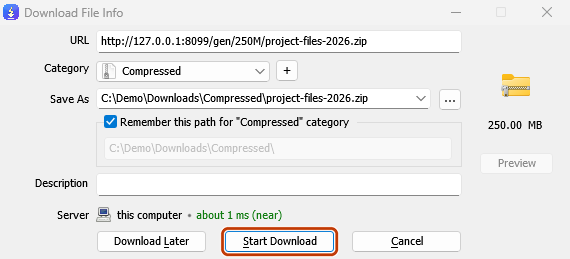
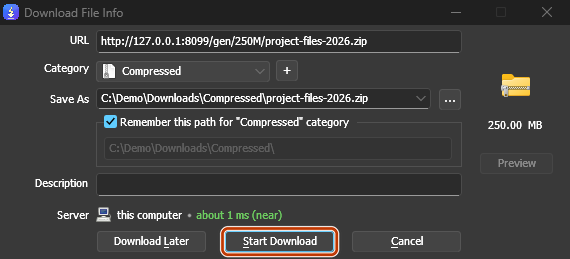
The browser's downloads, in VDM
Click a download link and Download File Info opens in VDM instead of the browser's own download bar. VDM gets the address together with the page it came from, your cookies for the site and the browser's User-Agent, so a download that needs you to be signed in still works. The browser's copy is cancelled and taken off its download list.
You decide what VDM takes. Options → File types lists the file types it catches (ZIP, RAR, EXE, ISO, MP4, PDF and many more) and the sites it leaves alone, and Options → General has the browsers it takes downloads from. Everything else stays with the browser.
VDM doesn't need to be running first: the browser starts it. If VDM can't be reached at all, the download stays with the browser, so nothing is lost.
마우스 오른쪽 버튼 클릭 또는 동영상 위의 버튼
Right-click a link, a picture, a video or a sound and choose Download with Mister Download Manager: VDM downloads it whatever its type.
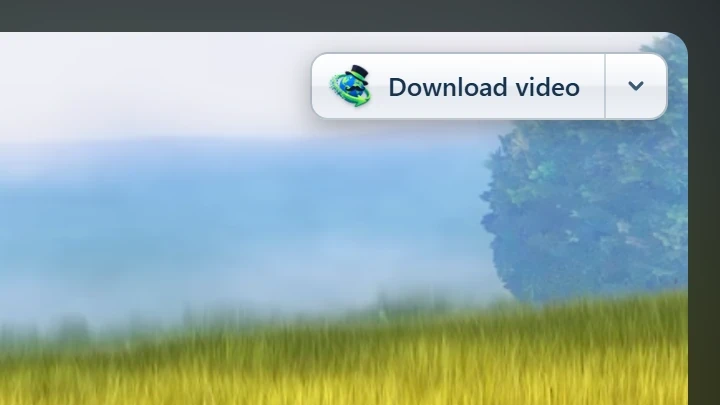
Point at a video and a small Download video button appears at its edge. It opens VDM's Download video from a page window with the qualities on offer (see video downloads). On many pages it finds the video before it plays, from the stream address the page wrote for its player. You can hide it on one video or one site, or turn it off in Options.
페이지의 모든 이미지
To save a whole gallery, open the toolbar button's This page tab and click Find images. The extension finds each picture the page shows at the largest size the page lists for it, the ones it loads only as you scroll, and links that go straight to a picture, each once. Leave out icons and thumbnails with a smallest width and height, and any type you don't want (JPEG, PNG, WebP, GIF, AVIF...), then Send to Link grabber: VDM looks each one up for its name and size, and you tick there the ones to download. Nothing is looked for until you click.
페이지를 마우스 오른쪽 버튼으로 클릭하여 모든 링크 다운로드(또는 선택 항목의 경우 선택한 링크 다운로드)를 선택하면 페이지의 그림도 함께 다운로드됩니다. 링크 그래버는 이 웹 페이지에 있는 이미지 숨기기 아래에 그림을 숨겨둡니다. 페이지 링크와 함께 그림을 선택하려면 이 옵션을 선택 해제하세요.
스토어에서 설치, 최신 상태 유지
Install VDM with its setup and keep Set up browser integration ticked. Then add the extension: Firefox 140 or later takes it from addons.mozilla.org, and Chrome, Edge, Brave, Opera and Vivaldi from the Chrome Web Store. The browser keeps it updated.
휴대용 버전은 폴더 외부에 아무것도 쓰지 않으므로 브라우저에 연결할 수 없습니다. 이 점은 명확한 제한 사항입니다.
브라우저 확장 기능, 버전 0.5.0
- The toolbar button says whether the browser reaches VDM, and How to fix it opens the help for the reason. When a setting leaves a download to the browser (its type isn't in File types, its site is excluded, it's under the minimum size), the button names the setting and the file, and VDM's log keeps a line for each.
- 이 페이지의 미디어는 페이지가 로드한 비디오 스트림과 비디오 및 사운드 파일을 나열하므로 링크가 없는 비디오도 저장할 수 있습니다. 복사 방지된 스트림은 보호됨으로 나열되며 전송되지 않습니다.
- 모든 링크 다운로드 및 선택한 링크 다운로드는 페이지의 링크를 링크 그래버로 보냅니다.
- PDFs, music and videos the browser would open itself, and downloads from forms, go to VDM too. Hold Alt while clicking to let the browser have one.
- Browsers built on Firefox or Chromium, such as Zen, LibreWolf, Floorp, Waterfox and Helium, reach VDM. Flatpak browsers on Linux can't start VDM's helper.
- Test browser integration... in Options → General checks VDM's side.
무료, 오픈 소스, 광고 없음, 평가판 없음.
Download Volt Download Manager