

- Inicio
- Características
- Aceleración y reanudación
Todas las conexiones a la vez. Se retoma donde se detuvo.
VDM splits a file into parts and downloads them side by side, then keeps every connection busy until the last byte. If the line drops or the computer restarts, the download carries on from where it was.
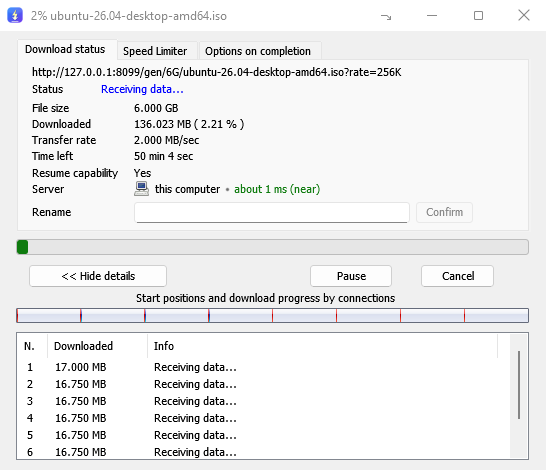
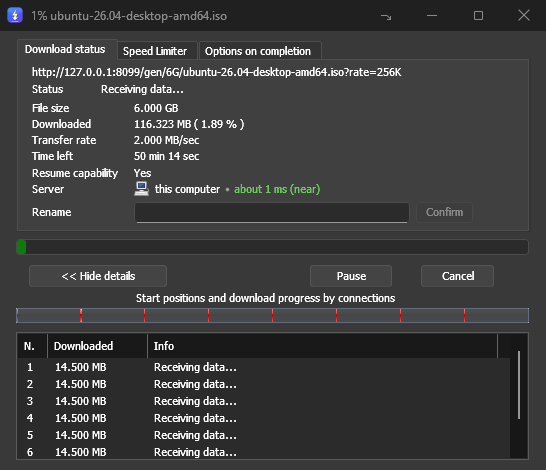
Ninguna conexión inactiva
VDM opens 8 connections by default, and you can set anything from 1 to 32 in Options → Connection. When a connection finishes its part, it takes over half of the largest part still left, so the work is shared out again and again until the file is done. A connection that falls far behind the others is dropped and opened again.
La ventana de progreso lo muestra a medida que sucede: una barra del archivo completo con el inicio y el progreso de cada conexión, y una tabla con lo que cada conexión está haciendo en ese momento.
Medido, no declarado
On the same PC, downloading from a test server on that PC, VDM fetched a 1 GiB file in 1.0 s against IDM 6.42's 5.5 s, and a 256 KiB file in 0.03 s against 3.1 s: the medians of alternating runs. It is a loopback test: it times the programs, not an internet connection. The benchmark page has every run, the method and the raw data.
More connections help only where a server sends each one at a limited speed. Most servers allow a few connections per address, and VDM notices when one says no: it stops asking that server for more and lists what it learned under Exceptions in Options → Connection. You can set a number for a server yourself there too.
Reglas por sitio
Options → Connection → Site rules... gives every download from a site (*.example.com) its
own User-Agent, extra request headers, number of connections, a browser's way of connecting
from the first request, or a proxy: none, or one of its own, so only the sites that need a proxy
go through one. A stopped download's Properties → Connection... changes its own
headers, proxy and connections, and VDM still checks the file is the same one before it goes on.
Más de 32, si las quieres
Permitir más de 32 conexiones en Opciones → Conexión eleva el límite a 128 por descarga, también para excepciones de servidor. La opción -c de la línea de comandos acepta de 1 a 128.
Reanudación que sobrevive a un fallo
VDM saves how far each part has got as it goes. A download picks up where it stopped after you pause it, after the connection drops, or after Windows or VDM itself crashes. A connection that fails is retried on its own, and the table shows Retrying with the reason.
Before it continues, VDM checks that the file on the server is still the same one, so a changed file never gets stitched onto an old half. When a server can't send a file in parts, the progress window says Resume capability: No before you rely on it.
Directo al disco
Each connection writes directly into the file's place on disk, in a part file next to the final one. There is no temporary folder and no joining step at the end: when the last part arrives, VDM checks the size and renames the file.
Reanudar una descarga interrumpida muestra qué hacer cuando un vínculo ha caducado.
Gratis, código abierto, sin anuncios, sin prueba.
Download Volt Download Manager