

Primero, comprueba qué ha pasado
Cada descarga guarda un registro de sus eventos recientes: reintentos, redirecciones, respuestas y errores del servidor.
- Coloca el cursor sobre el Estado de la descarga en la lista para verlos.
- O abre su ventana de progreso (haz doble clic en una descarga sin terminar). La tabla de conexiones muestra qué está haciendo cada conexión y el motivo de Reintentando cuando falla alguna.
- Propiedades del archivo (Alt+Enter) muestra Último intento y su Resultado.
Una descarga muestra Error
- Lee el motivo (coloca el cursor sobre Estado).
- Selecciona la descarga y haz clic en Reanudar. Muchos errores se deben a problemas puntuales del servidor o de la conexión.
- If the link has expired (common for links from sites you sign in to, or links with a time limit in them), get a new one: right-click → Refresh download address, then start the download again in the browser, and VDM gives its new address to the download that waits for it, which continues (a Rapidgator download waits by itself: starting it again in the browser is enough). See Resume a broken download.
- If it says the file changed on the server, the file isn't the one VDM started with. Right-click → Redownload to start again from the beginning.
- Si aparece Google Drive no proporcionará este archivo ahora, se ha alcanzado el límite de descargas de Drive para ese archivo. Consulta Enlaces de Google Drive.
- If it says this site lets only browsers through, the site's bot check (Cloudflare's, for one) turned VDM away. VDM has already asked once more connecting the way your browser does, with your browser's cookies for that site, and once under its own name (some checks let a program that says what it is through), and the site still wants its check answered in a browser. Hold Alt (Option on a Mac) as you click the link: the browser opens it in the tab, runs the site's check there ("Just a moment...", sometimes a box to tick), and keeps the download that comes after it. VDM leaves that download alone for a minute after your click. See Browser integration.
- If it says the site sent a web page instead of the file, the link led to the site's own page: a file host's countdown, a captcha, a Download button to press, or a sign-in. VDM never saves that page as your file. Click Open in browser in the download's progress window (or open the link yourself), finish there, and when the browser starts the real download, VDM's extension hands it to VDM. Without the extension, let the browser download it.
Una descarga aparece como «Dañado»
La prueba del archivo encontró ficheros que no se leen completos (Probar archivos): pasa el ratón por encima de Estado para ver cuáles.
- Haz clic derecho → Volver a descargar (o Volver a descargar en la ventana Archivo dañado) para descargarlo de nuevo desde el principio.
- A ZIP whose damaged parts VDM downloaded again and still came damaged, or a 7z or RAR that is damaged again after a Redownload, is probably damaged on the server itself: ask the site for another copy.
- Para probarlo de nuevo manualmente, haz clic derecho → Probar archivo.
Una descarga se reinicia en lugar de reanudarse
- Look at Resume capability in the progress window. No means the server can't send a file in parts, so VDM can't continue it later.
- Algunos servidores indican una fecha nueva para el mismo archivo cada vez. Activa Opciones → Descargas → Ignorar cambios en la hora de modificación del archivo al reanudar una descarga.
Las descargas son lentas
- Comprueba que el Limitador de velocidad esté desactivado: Descargas → Limitador de velocidad → Desactivar. Comprueba también Descargas → Limitador de velocidad → Configuración... → Limitar todas las descargas juntas a, que se aplica incluso cuando el limitador está desactivado.
- Comprueba la pestaña Limitador de velocidad de la descarga en su ventana de progreso.
- Check Options → Connection. A low Default max. conn. number, or an exception for the server, means fewer connections. Rows marked (auto) are servers that refused more connections; VDM can't do more there.
- Comprueba los Límites de descarga en el Programador. Al alcanzar el límite, las descargas quedan en espera con el estado Esperando: se ha alcanzado el límite de descarga (Programador).
The browser doesn't send downloads to VDM
- Was VDM installed with the setup, with Set up browser integration ticked? A portable copy can't take browser downloads. Run the setup again to add it.
- Is the extension loaded and turned on? Look for Volt Download Manager on the browser's extensions page. In Firefox, install it from addons.mozilla.org: a temporary add-on is gone after a restart. See Browser integration.
- ¿Está activada la opción Opciones → General → Usar integración avanzada del navegador y está marcado tu navegador en Capturar descargas de los siguientes navegadores?
- Is the file's type in Options → File types? Only listed types are taken automatically. Download with Volt Download Manager on the right-click menu takes any link.
- ¿Está incluido el sitio en No iniciar descargas automáticamente desde los siguientes sitios?
When none of this helps, the browser keeps the download, so nothing is lost. The extension's toolbar button says why it couldn't reach VDM; see The browser and VDM aren't connected.
El Programador no inició la cola
- VDM must be running at that time. Closing the window is fine (it stays in the tray); Tasks → Exit is not.
- ¿Has hecho clic en Aplicar después de establecer la hora?
- La opción Diario solo se inicia los días marcados. La opción Una vez a las solo se inicia en esa fecha.
- Un equipo en reposo no ejecuta nada hasta que se activa, a menos que la cola tenga marcada la opción Reactivar el equipo para ejecutar esta cola (en Windows, necesita Permitir temporizadores de reactivación en el plan de energía; el Programador indica cuándo está desactivado). Consulta Reactivar el equipo para ejecutar una cola.
Un vídeo no se descarga
Consulta Si un vídeo no se descarga.
Un enlace magnet tarda mucho
A magnet link has to get the torrent's file list from other peers first. That can take a minute or two, and longer for torrents with few peers. If nobody answers in about three minutes, VDM gives up; try again later, or use the .torrent file if the site offers one.
VDM uses a lot of memory
El Administrador de tareas muestra varias cifras, y significan cosas distintas:
- Memory (on the Processes tab) is what VDM holds for itself alone, its private working set. With the window open and nothing downloading, that is about 70 MB.
- Working set (Details tab, add the column) adds memory shared with other programs. VDM draws its windows with the graphics card, so the graphics driver's memory counts here too, about 120 MB in all.
- Commit size is memory VDM has reserved, whether in use or not.
Closed to the notification area, VDM gives its memory back to Windows: Memory drops to under 10 MB within seconds and stays low while it waits. Downloads, queues and the scheduler go on as before. The list of every language (View → Language) loads fonts for every script while it's open; VDM lets them go when it closes.
El texto es demasiado pequeño o borroso
VDM keeps Internet Download Manager's compact sizes. On a large or high-resolution screen, choose View → Interface size (110 %, 115 %, 120 %, 125 %, 150 %, 175 % or 200 %), or press Ctrl + and Ctrl − in any VDM window, as in a browser; Ctrl 0 goes back to 100 %. Every window follows at once, and VDM starts at that size next time. It comes on top of Windows' own display scale (Settings → System → Display → Scale).
Where only the letters are too small, the sizes under View → Font draw the interface's text larger (or smaller) on its own: from 75 % to 150 % of the theme's sizes. The windows keep their compact layout, so nothing is pushed off the screen; the text is simply larger in the same place. View → Font also draws every window's text in a font file of your own (Choose a font file..., a TrueType, OpenType or collection file), and System font goes back to Segoe UI (Windows) or the computer's own font. While a file is in use, its own name sits checked in the menu, so what is on is always said. Both choices are saved for the next start. If the chosen file is moved or deleted, VDM draws with the system font until another one is chosen.
Una ventana más grande que la pantalla a ese tamaño (Opciones al 200 % en una pantalla de 1366 × 768) se abre tan grande como la pantalla lo permite, y el resto se desplaza: con las barras de desplazamiento, la rueda del ratón o Tab al siguiente control.
VDM tells Windows it draws for each monitor's own scale, so Windows never stretches its windows into blur, and it draws Windows' fonts grid-fitted to whole pixels. If the text still looks blurred, tell us your screen's resolution and Windows' display scale when you report it.
La ventana se congela o se dibuja mal
On Windows, VDM draws its windows with Direct3D 12; on Linux and macOS, with OpenGL, or with Vulkan (Linux) or Metal (macOS) when you choose them. A graphics driver can still misbehave: a window that holds still for seconds, flickers, or shows wrong colours or blocks. Try the other one: choose View → Draw with → OpenGL (or Direct3D, Vulkan, Metal), then quit VDM (Tasks → Exit) and start it again. Choosing the first one goes back the same way.
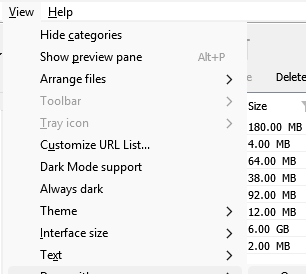
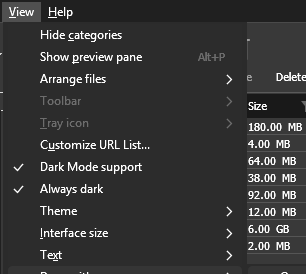
- If Direct3D, Vulkan or Metal can't start on your graphics card (no driver for it, some virtual machines), or its first window doesn't show within 10 seconds of its own (the time VDM spends loading your list and its icons doesn't count, however slow the computer is just after it starts), VDM draws with OpenGL, and View → Draw with says so and why. Choosing it again tries it again at the next start.
- En Linux, Vulkan necesita el controlador Vulkan de tu tarjeta gráfica: el de Mesa (
mesa-vulkan-driversen Ubuntu y Debian,vulkan-radeonovulkan-intelen Arch) para AMD e Intel, el propio controlador de NVIDIA para NVIDIA. - If neither can start, VDM draws with a software renderer (Microsoft's on Windows, Mesa's on Linux), so the window still opens (Remote Desktop, a virtual machine without a graphics driver). It works, but keeps the processor busier while a window changes.
- On Windows, Microsoft's software renderer (WARP) keeps the processor much busier than Mesa's (llvmpipe), the more so the larger the window. Where WARP draws for want of a graphics driver, VDM offers once to download llvmpipe (about 66 MB, from Mesa's Windows builds on GitHub), and View → Draw with → Download Mesa's software renderer (llvmpipe)... offers it at any time. Nothing downloads until you press Download; it is checked against VDM's signed list of checked builds, as ffmpeg is, and kept in VDM's data folder (
tools\mesa). VDM draws with it from its next start, and View → Draw with says Software (llvmpipe). If it can't start or draw there, VDM remembers that and draws with WARP again (Software (llvmpipe) didn't start here: WARP draws); a newer llvmpipe is tried again. To stop using it, quit VDM and delete thetools\mesafolder. - On Windows, when OpenGL fails on a card without Direct3D 12, VDM draws with Direct3D on Microsoft's software renderer (WARP) from the next start, and View → Draw with says why: OpenGL couldn't start, it is too old to draw VDM (older than 3.0, such as Intel's first HD Graphics, whose OpenGL 2.1 drew VDM's windows as garbage), its first window didn't show within 10 seconds, VDM froze inside the graphics driver while OpenGL showed a frame (the older Intel HD Graphics and AMD Radeon cards' drivers did), or VDM crashed inside it (OpenGL crashed inside its driver here). Choosing OpenGL there tries it again; so does a graphics driver update.
- If the graphics card is reset while VDM runs (a driver update, or a driver that resets by itself, as some older Radeon cards' do with Direct3D 12), VDM starts again by itself. Lost twice in 10 minutes, it goes back to OpenGL, and View → Draw with says why. If the card isn't back yet when VDM starts again, that start draws another way (OpenGL, or WARP), and the next start tries the card again.
- Actualizar el controlador gráfico desde el sitio del fabricante de la tarjeta (Intel, AMD o NVIDIA) soluciona muchos de estos problemas.
- A freeze whose report shows the window thread inside the graphics driver as it shows a frame (
ig4icd64.dllorig9icd64.dllfor Intel,nvoglv64.dllfor NVIDIA,atio6axx.dllfor AMD, underopengl32.dll) is the driver's OpenGL stuck, not VDM: on Windows, choose View → Draw with → Direct3D (the default) and restart VDM, and update the graphics driver. If Draw with says Direct3D didn't start there, the line under it says why; VDM then remembers the freeze and draws with WARP from the next start. - A crash report whose crashed thread is inside the graphics driver while VDM drew with OpenGL is the same: the driver's names above, or
d3d11.dllalone with nothing of VDM's on the thread (NVIDIA's driver on a laptop with two graphics chips shows OpenGL's frames through Direct3D 11). On Windows, VDM remembers it and draws with Direct3D 12 from the next start, on WARP if the card can't; updating the graphics driver is still the real fix. - A freeze or crash report says which one was drawing, on which graphics card and driver, and why that one (chosen, the default, or the other one failing), on its
Drawing with:line near the top: include it when you report a problem. A freeze report also says whether VDM was busy, waiting, or hardly ran at all (a computer too busy to run it); see Crash reports.
The setup or VDM won't start
- Si Windows dice Windows protegió su PC, haz clic en Más información, comprueba que el archivo es
VoltDownloadManager-<version>-setup.exede la página de Versiones y, a continuación, haz clic en Ejecutar de todos modos. - VDM runs only once. Starting it again brings the running copy's window to the front. If nothing appears, look for VDM's icon in the notification area.
- Linux, from the AppImage or the tar.gz: if the system lacks a library VDM's window needs (such as
libxkbcommon-x11), VDM names it on the terminal and in a message box, with the command that installs it (sudo apt install libxkbcommon-x11-0, or your distribution's). The .deb and .rpm bring these libraries themselves. In a Wayland session VDM opens its window on Wayland instead. - Linux, the first start is slow: VDM looks up the system's fonts for every script once, all together, while it starts (fontconfig); a first start on a busy computer can take a few seconds more. Install your distribution's Noto fonts if some scripts or symbols show as boxes.
My antivirus or VirusTotal flags VDM
It is most likely a false alarm. Some antivirus programs judge a program they don't know by an educated guess, not by a known virus: detection names such as Malware.AI, Gen:, ML or Heur mean such a guess. What they flag most is a new download few people have run yet, from a small project, without a publisher's signature; VDM's installer isn't code-signed yet. On VirusTotal, a handful of engines flagging a new setup while most stay clean is the usual sign of a false positive.
Comprueba que tu copia es la nuestra:
- Download VDM only from vdm.mikaillab.com or GitHub Releases.
- Obtén la suma de comprobación SHA-256 de tu archivo, con el nombre del archivo descargado en lugar de
<file>: en Windows, en PowerShell,Get-FileHash <file>; en Linux,sha256sum <file>; en macOS,shasum -a 256 <file>. - Compare it with the same file's line in that release's
SHA256SUMS.txt(capital or small letters don't matter). To be sure the list itself is ours, check its signature,SHA256SUMS.txt.sig, with VDM's release key: see Check your download.
If they match, it is the file we published. VDM is open source and built in public: every release is built from the public source code by GitHub Actions, on GitHub's servers, with every build's log there to see, so anyone can read what went into it and build it again.
Luego:
- Informa a tu antivirus de que el archivo es un falso positivo: Microsoft Defender, Malwarebytes, Avast, AVG, Bitdefender, Kaspersky, ESET.
- Dinos en GitHub qué antivirus fue, el nombre de la detección y el archivo, para que podamos informarlo también.
- If your antivirus quarantined VDM, restore it and add an exception for its folder.
Si la suma de comprobación no coincide, o la copia proviene de cualquier otro lugar, no la ejecutes: elimínala y dínoslo.
Las descargas HTTPS fallan con «no hay certificados» (Linux)
A minimal Linux system (often with the AppImage, the tar.gz or a build from source) may have no CA certificates, which VDM needs to check a secure server. Plain http:// and ftp:// downloads still work; each https:// or ftps:// one stops at once saying the computer has no certificates to check the server with. Install the ca-certificates package (sudo apt install ca-certificates, sudo dnf install ca-certificates), then resume the download. The .deb and .rpm bring it.
Las descargas HTTPS fallan con «no es de confianza» o «emisor desconocido»
VDM checks a secure server's certificate the way your browser does: with your system's trusted certificates (Windows', macOS's, or the Linux CA bundle), and with Mozilla's, the ones Firefox carries. On Windows, Mozilla's are used only when Windows' own don't complete the chain; on macOS and Linux they are added to the system's. A Windows 10 or 11 that hasn't been updated for a while fetches the roots it trusts from Windows Update only when a site first needs one, and behind a proxy that can fail: VDM then goes by Firefox's list, so such a site still downloads. One consequence: a root you removed from the system's store, or marked as not trusted, is still trusted by VDM when Mozilla's list has it, as Firefox trusts it.
If a site still says not trusted (self-signed or from an unknown issuer), its certificate isn't from an issuer any browser trusts. On a company or school network, a proxy or an antivirus that inspects HTTPS shows its own certificate instead of the site's: VDM trusts it when it is installed in the system's store, as Edge and Chrome do (Firefox has its own setting for it). Opening the site in Edge (on Windows) shows the same certificate VDM sees.
Dónde están tus datos
- Instalado o el zip simple:
%APPDATA%\voltdownloadmanager. La lista y la configuración están endownloads.json. - Portátil: la carpeta
datajunto avoltdownloadmanager.exe. - Linux:
~/.local/share/voltdownloadmanager; un Mac:~/Library/Application Support/voltdownloadmanager. - Las contraseñas (Inicios de sesión de sitios, el proxy, cuentas de debrid) están en el llavero del sistema, no en
downloads.json; consulta Opciones → Inicios de sesión de sitios.
To back up your list, quit VDM (Tasks → Exit) and copy downloads.json.
Actualizaciones
Help → Check for updates... tells you whether a newer version is out, and what is new in it. Check for updates at every start in that window lets VDM look by itself: a few seconds after it starts, and once a day while it stays open. When there's a new version, its window opens in front.
When there is one, Update now downloads it, checks it, puts it in place and restarts VDM; your list, settings and downloads stay as they are:
| Instalación | Qué hace Actualizar ahora |
|---|---|
| Windows, el instalador | Ejecuta el nuevo instalador sin mostrar sus ventanas. Una instalación para todos los usuarios solicita permiso de administrador. |
| Windows, el zip portátil o simple | Reemplaza los programas en su carpeta (se mantiene la carpeta data de una copia portátil). |
| Mac | Reemplaza la aplicación en Aplicaciones. |
| Linux, el AppImage o el .tar.gz | Reemplaza el AppImage, o los programas en su carpeta. |
| Linux, el .deb o .rpm | Abre el paquete comprobado en el instalador de paquetes de tu sistema, que te pide tu contraseña. |
| Linux, paquete de otro gestor de paquetes (pacman, ...) | Nada: la ventana lo indica, y las actualizaciones de tu sistema traen la nueva versión. |
VDM installs an update only when the release's list of checksums is signed by VDM's release key and the file matches it; anything else is refused, and Download opens the Releases page instead. Updating this way starts with version 0.2.1: earlier versions open the Releases page.
VDM asks GitHub's API for the newest version (of VDM, and of yt-dlp). GitHub answers 60 such questions an hour for each internet address, so on a network many people share (a mobile or home internet provider that puts many customers behind one address, a campus, an office) others can use them up. VDM then reads GitHub's ordinary release pages instead, with the same checks of what it downloads. If GitHub refuses those too, the window says api.github.com refused the request (403 Forbidden): too many requests from your network for now: try again in an hour, or from another network.
El AppImage también se puede actualizar con herramientas de AppImage (AppImageLauncher, Gear Lever, AppImageUpdate): lleva la dirección de sus actualizaciones, y cada versión tiene su archivo .AppImage.zsync, por lo que esas herramientas solo descargan las partes que cambiaron. Esto comienza con el AppImage de la versión posterior a la 0.2.4.
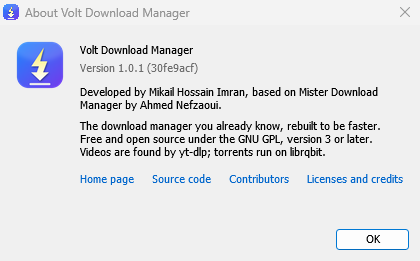
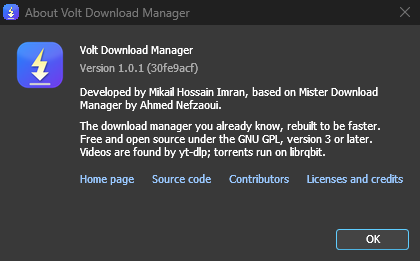
Help → About Volt Download Manager shows the version you have.
Informar de un problema
Choose Help → Report a problem. It opens the bug report form on GitHub with your VDM version, your system and its version, how VDM was installed and its interface language already filled in. Describe what happened, what you expected and the steps that make it happen. For a download, include the address if you can share it, and the reason shown under Status.
También puedes abrir el formulario tú mismo; pide los mismos datos.
Pasos siguientes
- Reanudar una descarga interrumpida →
- Integración con el navegador →
- Volver al índice de la documentación →
Gratis, código abierto, sin anuncios, sin prueba.
Download Volt Download Manager