

首先,查看发生了什么
每个下载任务都会记录近期事件:重试、重定向、服务器响应和错误。
- 将鼠标悬停在列表中的下载状态上即可查看这些信息。
- 也可以打开下载进度窗口(双击未完成的下载)。连接表会显示每个连接正在执行的操作;连接失败时,还会显示正在重试及失败原因。
- 文件属性(Alt+Enter)会显示上次尝试及其结果。
下载显示“错误”
- 查看错误原因(将鼠标悬停在状态上)。
- 选择下载任务并点击恢复。很多错误只是服务器或连接暂时出了问题。
- If the link has expired (common for links from sites you sign in to, or links with a time limit in them), get a new one: right-click → Refresh download address, then start the download again in the browser, and VDM gives its new address to the download that waits for it, which continues (a Rapidgator download waits by itself: starting it again in the browser is enough). See Resume a broken download.
- If it says the file changed on the server, the file isn't the one VDM started with. Right-click → Redownload to start again from the beginning.
- 如果显示Google 云端硬盘暂时无法提供此文件,则该文件已达到 Google 云端硬盘的下载限制。另请参阅Google 云端硬盘链接。
- If it says this site lets only browsers through, the site's bot check (Cloudflare's, for one) turned VDM away. VDM has already asked once more connecting the way your browser does, with your browser's cookies for that site, and once under its own name (some checks let a program that says what it is through), and the site still wants its check answered in a browser. Hold Alt (Option on a Mac) as you click the link: the browser opens it in the tab, runs the site's check there ("Just a moment...", sometimes a box to tick), and keeps the download that comes after it. VDM leaves that download alone for a minute after your click. See Browser integration.
- If it says the site sent a web page instead of the file, the link led to the site's own page: a file host's countdown, a captcha, a Download button to press, or a sign-in. VDM never saves that page as your file. Click Open in browser in the download's progress window (or open the link yourself), finish there, and when the browser starts the real download, VDM's extension hands it to VDM. Without the extension, let the browser download it.
下载显示“已损坏”
其存档测试发现其中文件无法完整读取(测试存档):将鼠标悬停在状态上可查看具体是哪些文件。
- 右键点击 → 重新下载(或在损坏的存档窗口中点击重新下载)会从头开始再次下载。
- A ZIP whose damaged parts VDM downloaded again and still came damaged, or a 7z or RAR that is damaged again after a Redownload, is probably damaged on the server itself: ask the site for another copy.
- 要手动再次测试,请右键点击 → 测试存档。
下载重新开始而不是恢复
- Look at Resume capability in the progress window. No means the server can't send a file in parts, so VDM can't continue it later.
- 有些服务器每次都会为同一个文件报告新的日期。勾选选项 → 下载 → 恢复下载时忽略文件修改时间更改。
下载速度慢
- 检查速度限制器是否已关闭:下载 → 速度限制器 → 关闭。还要查看下载 → 速度限制器 → 设置... → 将所有下载总计限制为;即使关闭速度限制器,此设置仍然生效。
- 在下载进度窗口中查看该下载自己的速度限制器选项卡。
- Check Options → Connection. A low Default max. conn. number, or an exception for the server, means fewer connections. Rows marked (auto) are servers that refused more connections; VDM can't do more there.
- 检查计划程序中的下载限制。达到限制后,下载任务会显示等待: 已达到下载限制(计划程序)。
The browser doesn't send downloads to VDM
- Was VDM installed with the setup, with Set up browser integration ticked? A portable copy can't take browser downloads. Run the setup again to add it.
- Is the extension loaded and turned on? Look for Volt Download Manager on the browser's extensions page. In Firefox, install it from addons.mozilla.org: a temporary add-on is gone after a restart. See Browser integration.
- 是否已启用选项 → 常规 → 使用高级浏览器集成,并在从以下浏览器捕获下载下勾选了您的浏览器?
- Is the file's type in Options → File types? Only listed types are taken automatically. Download with Volt Download Manager on the right-click menu takes any link.
- 该网站是否在不要从以下网站自动开始下载中?
When none of this helps, the browser keeps the download, so nothing is lost. The extension's toolbar button says why it couldn't reach VDM; see The browser and VDM aren't connected.
计划程序未启动队列
- VDM must be running at that time. Closing the window is fine (it stays in the tray); Tasks → Exit is not.
- 设置时间后,是否点击了应用?
- 每日只在勾选的日期启动。一次在只在该日期启动。
- 电脑在休眠状态下不会运行任何程序,除非队列勾选了唤醒电脑以运行此队列(在 Windows 上,电源计划中需要允许唤醒定时器;计划程序会显示其何时关闭)。请参阅唤醒电脑以运行队列。
视频无法下载
请参阅视频无法下载时。
磁力链接需要很长时间
A magnet link has to get the torrent's file list from other peers first. That can take a minute or two, and longer for torrents with few peers. If nobody answers in about three minutes, VDM gives up; try again later, or use the .torrent file if the site offers one.
VDM uses a lot of memory
任务管理器会显示多个数值,它们代表的含义各不相同:
- Memory (on the Processes tab) is what VDM holds for itself alone, its private working set. With the window open and nothing downloading, that is about 70 MB.
- Working set (Details tab, add the column) adds memory shared with other programs. VDM draws its windows with the graphics card, so the graphics driver's memory counts here too, about 120 MB in all.
- Commit size is memory VDM has reserved, whether in use or not.
Closed to the notification area, VDM gives its memory back to Windows: Memory drops to under 10 MB within seconds and stays low while it waits. Downloads, queues and the scheduler go on as before. The list of every language (View → Language) loads fonts for every script while it's open; VDM lets them go when it closes.
文字太小或模糊
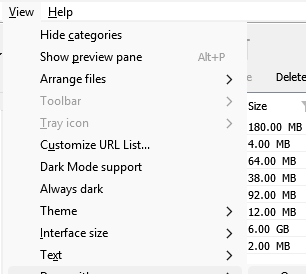
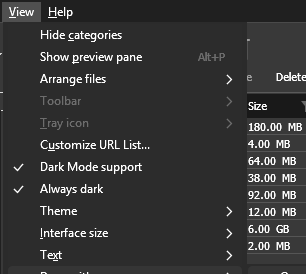
VDM keeps Internet Download Manager's compact sizes. On a large or high-resolution screen, choose View → Interface size (110 %, 115 %, 120 %, 125 %, 150 %, 175 % or 200 %), or press Ctrl + and Ctrl − in any VDM window, as in a browser; Ctrl 0 goes back to 100 %. Every window follows at once, and VDM starts at that size next time. It comes on top of Windows' own display scale (Settings → System → Display → Scale).
Where only the letters are too small, the sizes under View → Font draw the interface's text larger (or smaller) on its own: from 75 % to 150 % of the theme's sizes. The windows keep their compact layout, so nothing is pushed off the screen; the text is simply larger in the same place. View → Font also draws every window's text in a font file of your own (Choose a font file..., a TrueType, OpenType or collection file), and System font goes back to Segoe UI (Windows) or the computer's own font. While a file is in use, its own name sits checked in the menu, so what is on is always said. Both choices are saved for the next start. If the chosen file is moved or deleted, VDM draws with the system font until another one is chosen.
如果窗口在该尺寸下大于屏幕(例如在 1366 × 768 屏幕上,选项窗口设置为 200 %),它会以屏幕允许的最大尺寸打开,其余部分可滚动:使用滚动条、鼠标滚轮,或按Tab键切换到下一个控件。
VDM tells Windows it draws for each monitor's own scale, so Windows never stretches its windows into blur, and it draws Windows' fonts grid-fitted to whole pixels. If the text still looks blurred, tell us your screen's resolution and Windows' display scale when you report it.
窗口冻结或显示异常
On Windows, VDM draws its windows with Direct3D 12; on Linux and macOS, with OpenGL, or with Vulkan (Linux) or Metal (macOS) when you choose them. A graphics driver can still misbehave: a window that holds still for seconds, flickers, or shows wrong colours or blocks. Try the other one: choose View → Draw with → OpenGL (or Direct3D, Vulkan, Metal), then quit VDM (Tasks → Exit) and start it again. Choosing the first one goes back the same way.
- If Direct3D, Vulkan or Metal can't start on your graphics card (no driver for it, some virtual machines), or its first window doesn't show within 10 seconds of its own (the time VDM spends loading your list and its icons doesn't count, however slow the computer is just after it starts), VDM draws with OpenGL, and View → Draw with says so and why. Choosing it again tries it again at the next start.
- 在 Linux 上,Vulkan 需要显卡的 Vulkan 驱动程序:AMD 和 Intel 显卡需要 Mesa 驱动(Ubuntu 和 Debian 上使用
mesa-vulkan-drivers,Arch 上使用vulkan-radeon或vulkan-intel);NVIDIA 显卡需要使用 NVIDIA 自带的驱动程序。 - If neither can start, VDM draws with a software renderer (Microsoft's on Windows, Mesa's on Linux), so the window still opens (Remote Desktop, a virtual machine without a graphics driver). It works, but keeps the processor busier while a window changes.
- On Windows, Microsoft's software renderer (WARP) keeps the processor much busier than Mesa's (llvmpipe), the more so the larger the window. Where WARP draws for want of a graphics driver, VDM offers once to download llvmpipe (about 66 MB, from Mesa's Windows builds on GitHub), and View → Draw with → Download Mesa's software renderer (llvmpipe)... offers it at any time. Nothing downloads until you press Download; it is checked against VDM's signed list of checked builds, as ffmpeg is, and kept in VDM's data folder (
tools\mesa). VDM draws with it from its next start, and View → Draw with says Software (llvmpipe). If it can't start or draw there, VDM remembers that and draws with WARP again (Software (llvmpipe) didn't start here: WARP draws); a newer llvmpipe is tried again. To stop using it, quit VDM and delete thetools\mesafolder. - On Windows, when OpenGL fails on a card without Direct3D 12, VDM draws with Direct3D on Microsoft's software renderer (WARP) from the next start, and View → Draw with says why: OpenGL couldn't start, it is too old to draw VDM (older than 3.0, such as Intel's first HD Graphics, whose OpenGL 2.1 drew VDM's windows as garbage), its first window didn't show within 10 seconds, VDM froze inside the graphics driver while OpenGL showed a frame (the older Intel HD Graphics and AMD Radeon cards' drivers did), or VDM crashed inside it (OpenGL crashed inside its driver here). Choosing OpenGL there tries it again; so does a graphics driver update.
- If the graphics card is reset while VDM runs (a driver update, or a driver that resets by itself, as some older Radeon cards' do with Direct3D 12), VDM starts again by itself. Lost twice in 10 minutes, it goes back to OpenGL, and View → Draw with says why. If the card isn't back yet when VDM starts again, that start draws another way (OpenGL, or WARP), and the next start tries the card again.
- 从显卡厂商(Intel、AMD 或 NVIDIA)的网站更新显卡驱动程序,可以解决许多此类问题。
- A freeze whose report shows the window thread inside the graphics driver as it shows a frame (
ig4icd64.dllorig9icd64.dllfor Intel,nvoglv64.dllfor NVIDIA,atio6axx.dllfor AMD, underopengl32.dll) is the driver's OpenGL stuck, not VDM: on Windows, choose View → Draw with → Direct3D (the default) and restart VDM, and update the graphics driver. If Draw with says Direct3D didn't start there, the line under it says why; VDM then remembers the freeze and draws with WARP from the next start. - A crash report whose crashed thread is inside the graphics driver while VDM drew with OpenGL is the same: the driver's names above, or
d3d11.dllalone with nothing of VDM's on the thread (NVIDIA's driver on a laptop with two graphics chips shows OpenGL's frames through Direct3D 11). On Windows, VDM remembers it and draws with Direct3D 12 from the next start, on WARP if the card can't; updating the graphics driver is still the real fix. - A freeze or crash report says which one was drawing, on which graphics card and driver, and why that one (chosen, the default, or the other one failing), on its
Drawing with:line near the top: include it when you report a problem. A freeze report also says whether VDM was busy, waiting, or hardly ran at all (a computer too busy to run it); see Crash reports.
The setup or VDM won't start
- 如果 Windows 提示Windows 已保护你的电脑,请点击更多信息,确认文件
VoltDownloadManager-<version>-setup.exe来自发布页面,然后点击仍要运行。 - VDM runs only once. Starting it again brings the running copy's window to the front. If nothing appears, look for VDM's icon in the notification area.
- Linux, from the AppImage or the tar.gz: if the system lacks a library VDM's window needs (such as
libxkbcommon-x11), VDM names it on the terminal and in a message box, with the command that installs it (sudo apt install libxkbcommon-x11-0, or your distribution's). The .deb and .rpm bring these libraries themselves. In a Wayland session VDM opens its window on Wayland instead. - Linux, the first start is slow: VDM looks up the system's fonts for every script once, all together, while it starts (fontconfig); a first start on a busy computer can take a few seconds more. Install your distribution's Noto fonts if some scripts or symbols show as boxes.
My antivirus or VirusTotal flags VDM
It is most likely a false alarm. Some antivirus programs judge a program they don't know by an educated guess, not by a known virus: detection names such as Malware.AI, Gen:, ML or Heur mean such a guess. What they flag most is a new download few people have run yet, from a small project, without a publisher's signature; VDM's installer isn't code-signed yet. On VirusTotal, a handful of engines flagging a new setup while most stay clean is the usual sign of a false positive.
请检查您的副本是否来自我们:
- Download VDM only from vdm.mikaillab.com or GitHub Releases.
- 获取文件的 SHA-256 校验和,将下载文件的名称替换
<file>:在 Windows 上,于 PowerShell 中运行Get-FileHash <file>;在 Linux 上运行sha256sum <file>;在 macOS 上运行shasum -a 256 <file>。 - Compare it with the same file's line in that release's
SHA256SUMS.txt(capital or small letters don't matter). To be sure the list itself is ours, check its signature,SHA256SUMS.txt.sig, with VDM's release key: see Check your download.
If they match, it is the file we published. VDM is open source and built in public: every release is built from the public source code by GitHub Actions, on GitHub's servers, with every build's log there to see, so anyone can read what went into it and build it again.
然后:
- 向您的杀毒软件报告该文件为误报:Microsoft Defender、Malwarebytes、Avast、AVG、Bitdefender、Kaspersky、ESET。
- 在 GitHub 上告诉我们是哪款杀毒软件、检测名称和文件,以便我们也能报告。
- If your antivirus quarantined VDM, restore it and add an exception for its folder.
如果校验和不匹配,或者副本来自其他任何地方,请不要运行它:删除它并告诉我们。
HTTPS 下载失败,显示“无证书”(Linux)
A minimal Linux system (often with the AppImage, the tar.gz or a build from source) may have no CA certificates, which VDM needs to check a secure server. Plain http:// and ftp:// downloads still work; each https:// or ftps:// one stops at once saying the computer has no certificates to check the server with. Install the ca-certificates package (sudo apt install ca-certificates, sudo dnf install ca-certificates), then resume the download. The .deb and .rpm bring it.
HTTPS 下载失败,提示“不受信任”或“未知颁发者”
VDM checks a secure server's certificate the way your browser does: with your system's trusted certificates (Windows', macOS's, or the Linux CA bundle), and with Mozilla's, the ones Firefox carries. On Windows, Mozilla's are used only when Windows' own don't complete the chain; on macOS and Linux they are added to the system's. A Windows 10 or 11 that hasn't been updated for a while fetches the roots it trusts from Windows Update only when a site first needs one, and behind a proxy that can fail: VDM then goes by Firefox's list, so such a site still downloads. One consequence: a root you removed from the system's store, or marked as not trusted, is still trusted by VDM when Mozilla's list has it, as Firefox trusts it.
If a site still says not trusted (self-signed or from an unknown issuer), its certificate isn't from an issuer any browser trusts. On a company or school network, a proxy or an antivirus that inspects HTTPS shows its own certificate instead of the site's: VDM trusts it when it is installed in the system's store, as Edge and Chrome do (Firefox has its own setting for it). Opening the site in Edge (on Windows) shows the same certificate VDM sees.
数据存储位置
- 已安装版或普通 zip 版:
%APPDATA%\voltdownloadmanager。列表和设置位于downloads.json中。 - 便携版:
voltdownloadmanager.exe旁边的data文件夹。 - Linux:
~/.local/share/voltdownloadmanager;Mac:~/Library/Application Support/voltdownloadmanager。 - 密码(站点登录、代理、网盘账户)存储在系统的钥匙串中,而不是在
downloads.json中;请参阅选项 → 站点登录。
To back up your list, quit VDM (Tasks → Exit) and copy downloads.json.
更新
Help → Check for updates... tells you whether a newer version is out, and what is new in it. Check for updates at every start in that window lets VDM look by itself: a few seconds after it starts, and once a day while it stays open. When there's a new version, its window opens in front.
When there is one, Update now downloads it, checks it, puts it in place and restarts VDM; your list, settings and downloads stay as they are:
| 安装方式 | “立即更新”执行的操作 |
|---|---|
| Windows,安装程序 | 在后台运行新的安装程序。为所有用户安装时,需要管理员授权。 |
| Windows,便携版或普通 zip | 替换其文件夹中的程序(便携版副本的data文件夹会保留)。 |
| Mac | 替换“应用程序”中的应用。 |
| Linux,AppImage 或 .tar.gz | 替换 AppImage,或其文件夹中的程序。 |
| Linux,.deb 或 .rpm | 在系统的软件包安装程序中打开已检查的软件包;安装程序会要求输入密码。 |
| Linux,其他包管理器(pacman 等)的包 | 无:窗口会显示,并且您的系统更新会带来新版本。 |
VDM installs an update only when the release's list of checksums is signed by VDM's release key and the file matches it; anything else is refused, and Download opens the Releases page instead. Updating this way starts with version 0.2.1: earlier versions open the Releases page.
VDM asks GitHub's API for the newest version (of VDM, and of yt-dlp). GitHub answers 60 such questions an hour for each internet address, so on a network many people share (a mobile or home internet provider that puts many customers behind one address, a campus, an office) others can use them up. VDM then reads GitHub's ordinary release pages instead, with the same checks of what it downloads. If GitHub refuses those too, the window says api.github.com refused the request (403 Forbidden): too many requests from your network for now: try again in an hour, or from another network.
也可以使用 AppImage 工具(AppImageLauncher、Gear Lever、AppImageUpdate)更新 AppImage:其中包含更新地址,每个版本都有自己的 .AppImage.zsync 文件,因此这些工具只会下载发生变化的部分。此功能从 0.2.4 之后版本的 AppImage 开始提供。
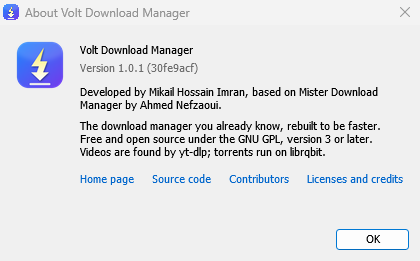
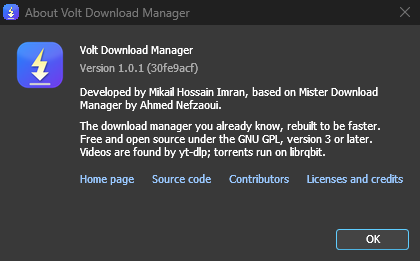
Help → About Volt Download Manager shows the version you have.
报告问题
Choose Help → Report a problem. It opens the bug report form on GitHub with your VDM version, your system and its version, how VDM was installed and its interface language already filled in. Describe what happened, what you expected and the steps that make it happen. For a download, include the address if you can share it, and the reason shown under Status.
你也可以自行打开表单;它会要求相同的详细信息。
下一步
免费、开源、无广告、无试用版。
Download Volt Download Manager