

If Volt Download Manager closes unexpectedly or stops responding, a crash report window opens. It shows what happened, lets you read the whole report, and can send it to the developers on GitHub. Each report helps fix the problem for everyone.
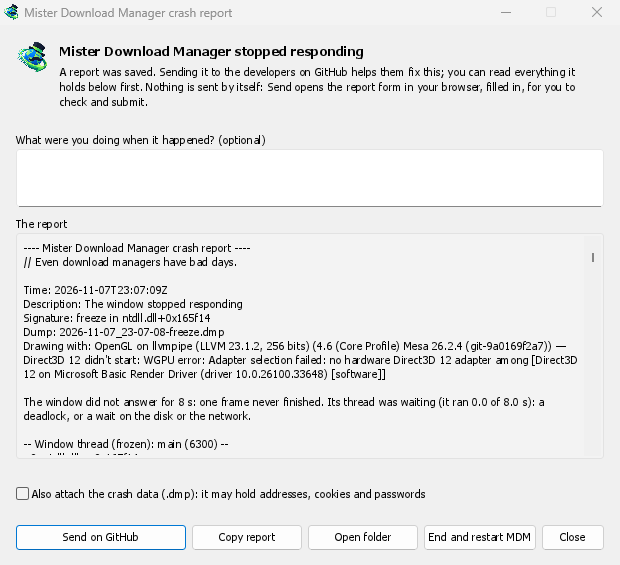
O que você vê
- Volt Download Manager closed unexpectedly: VDM crashed, or hit an internal error and closed.
- Volt Download Manager stopped responding: its window didn't answer for 8 seconds. VDM is still running, frozen. End and restart VDM closes the frozen copy and starts a new one. If VDM answers again by itself, the window says so.
Na janela:
- O que você estava fazendo quando aconteceu? é opcional. Algumas palavras, como "Abri Adicionar URL", ajudam muito.
- O relatório mostra tudo o que seria enviado. Leia-o primeiro, se quiser.
- Enviar no GitHub abre o formulário Crash report do GitHub no seu navegador, já preenchido, junto com a pasta que contém o relatório. Arraste o arquivo do relatório para o formulário, verifique-o e envie. Você precisa de uma conta GitHub. Nada é enviado automaticamente.
- Se alguém já relatou o mesmo problema, a janela informa (Já relatado como problema #…). Abrir o problema relatado o abre e coloca seu relatório na área de transferência, para que você possa adicioná-lo como um comentário.
The other buttons copy the report, open its folder, or start VDM again.
O que um relatório contém
- What happened: the error and the place in VDM's code where it happened.
- The stack: the place in VDM's code where it crashed or froze, and what every other part of it was doing.
- VDM's recent log: for example "command AddUrl" or "window opened: add-url".
- The system: VDM's version and how you installed it, your operating system and its version, the processor, the language and theme, and how many downloads and queues you have. These are counts only.
Ele não contém:
- seus endereços de download ou nomes de arquivo;
- seu nome de usuário, que aparece como
~nos caminhos das pastas.
Se uma mensagem de erro citar algo que você digitou, esse texto estará no relatório, então leia-o antes de enviar.
The crash data file (.dmp) is a snapshot of what VDM was running at that moment. It helps the developers most, but it can hold pieces of what VDM had in memory, such as download addresses, cookies and saved passwords. It is only attached when you tick Also attach the crash data.
Onde os relatórios são mantidos
In VDM's data folder:
crashes\: cada relatório (.txt) e seus dados de erro (.dmp);logs\: VDM's log (vdm.log, with older ones asvdm.1.logand so on, 2 MB each).
VDM's data folder is %APPDATA%\voltdownloadmanager on Windows, ~/Library/Application Support/voltdownloadmanager on macOS, and ~/.local/share/voltdownloadmanager on Linux. In portable mode it is the data folder next to the program.
The log records what VDM does, so a report can show what led to a problem. To log more detail, start VDM with the environment variable VDM_LOG=debug.
Para desenvolvedores
How it works: a second copy of VDM, the monitor, starts beside it with --crash-monitor. The crash code lives in crates/crash and crates/app/src/crash.rs.
- Catching problems. When VDM crashes (a Windows exception, a signal on Linux, a Mach exception on macOS), panics, or freezes, it asks the monitor for a dump. A freeze is a frame of the window running more than 8 s, seen by a watchdog thread that ignores time spent asleep and the first minute after the computer wakes, while its disk, network and screen come back: a stall then is written to the log, and reported only if it lasts past that minute. It times both parts of a frame: what VDM handles (the commands that come in, the clock of downloads, queues and the Scheduler), which runs minimized too, and the drawing; never the wait between frames, nor, on macOS, the time a system Open or Save dialog is open (macOS runs it on the window's thread, which waits there for your answer). The watchdog also measures how much processor time the window thread got meanwhile, and the report says what that means: it ran all along (a loop), it waited in a lock or on I/O (a deadlock), or it hardly ran in ordinary code, which is a computer too busy to run VDM or slow to load it from disk, most likely not VDM's bug (those share one signature,
freeze while the computer was busy). Each report also names what the frame was doing when it stopped (the tray icon, the downloads' progress, drawing the main window). When the window thread is already back in the event loop, or in the pause after a frame of a hidden window, by the time the dump is written, the freeze was over before the snapshot, so its stack can't explain it; those reports say so and share the signaturefreeze over before the snapshot. macOS doesn't measure it yet. The monitor then writes a minidump of every thread from outside, throughminidumperandcrash-handler. A crashed process never writes its own dump, which is how Firefox, Crashpad and Sentry do it too. - Lendo o dump. O monitor lê o dump com o
rust-minidumpda Mozilla. Ele usa os símbolos Breakpad da versão quando estão disponíveis. Uma compilação a partir do código-fonte também pode ler as informações de depuração nativas ao lado (seu.pdb, DWARF) quando compilada com--features vdm-crash/native-symbols; o aplicativo distribuído não inclui esse leitor, que ocupa vários MB. A Assinatura do relatório (por exemplo,freeze in voltdownloadmanager::winui::combo_edit) permanece a mesma nos relatórios de um mesmo problema, e a janela pesquisa problemas existentes por ela. - Símbolos. As compilações de lançamento mantêm tabelas de linha (
debug = "line-tables-only"), mas nenhum download inclui as informações de depuração. O CI as transforma emVoltDownloadManager-<version>-symbols-<platform>.zip(um por download que tem seus próprios programas:windows-x64,windows-arm64,windows-x86,linux-x86_64,linux-arm64,macos-arm64,macos-x86_64) (tools/installer/symbols.py, usando odump_symsda Mozilla), publicadas ao lado dos outros arquivos do lançamento. A janela de relatório busca o zip para sua própria versão quando uma pilha mostra endereços brutos. - Um
.dmpde um problema:
cargo run -p vdm-crash --bin vdm-symbolicate -- crash.dmp VoltDownloadManager-<version>-symbols-windows-x64.zip
- Testing it.
cargo test -p vdm-crashruns a real freeze, panic and crash (examples/crashy.rs) and checks each report's signature. To try it in the app, start VDM withVDM_CRASH_TEST=1, then runvoltdownloadmanager /show crash-test:freeze(a deadlock; orspin, 12 s of a busy window thread,panic,crash,abort).cargo test -p vdm-app --test freeze_report -- --ignoreddoes that in a copy of the app off the screens, its window visible and minimized.
Gratuito, de código aberto, sem anúncios, sem período de teste.
Download Volt Download Manager