

If Volt Download Manager closes unexpectedly or stops responding, a crash report window opens. It shows what happened, lets you read the whole report, and can send it to the developers on GitHub. Each report helps fix the problem for everyone.
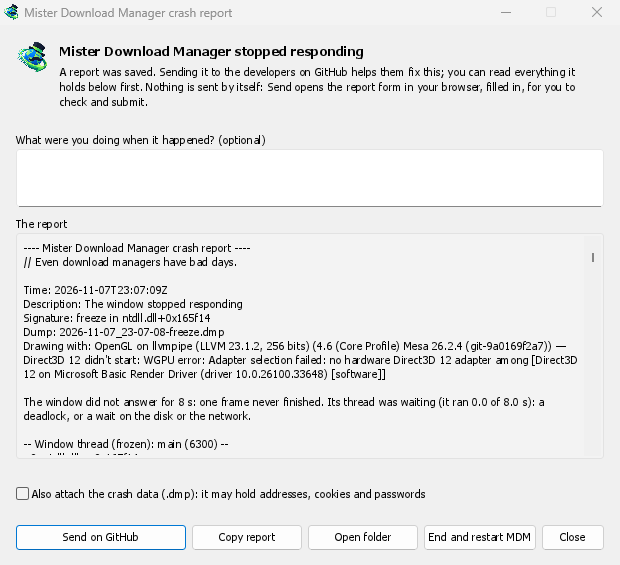
Cosa vedi
- Volt Download Manager closed unexpectedly: VDM crashed, or hit an internal error and closed.
- Volt Download Manager stopped responding: its window didn't answer for 8 seconds. VDM is still running, frozen. End and restart VDM closes the frozen copy and starts a new one. If VDM answers again by itself, the window says so.
Nella finestra:
- Cosa stavi facendo quando è successo? è facoltativo. Poche parole, come "Ho aperto Aggiungi URL", sono di grande aiuto.
- Il rapporto mostra tutto ciò che verrebbe inviato. Leggilo prima, se vuoi.
- Invia su GitHub apre nel browser il modulo Segnalazione di arresto anomalo di GitHub, già compilato, insieme alla cartella che contiene il rapporto. Trascina il file del rapporto nel modulo, verificalo e invia il modulo. Serve un account GitHub. Non viene inviato nulla automaticamente.
- Se qualcuno ha già segnalato lo stesso problema, la finestra lo indica (Già segnalato come issue #…). Apri la issue esistente la apre e copia il tuo rapporto negli appunti, così puoi aggiungerlo come commento.
The other buttons copy the report, open its folder, or start VDM again.
Cosa contiene un rapporto
- What happened: the error and the place in VDM's code where it happened.
- The stack: the place in VDM's code where it crashed or froze, and what every other part of it was doing.
- VDM's recent log: for example "command AddUrl" or "window opened: add-url".
- The system: VDM's version and how you installed it, your operating system and its version, the processor, the language and theme, and how many downloads and queues you have. These are counts only.
Non contiene nessuna di queste informazioni:
- i tuoi indirizzi di download o nomi di file;
- il tuo nome utente, che appare come
~nei percorsi delle cartelle.
Se un messaggio di errore cita qualcosa che hai digitato, quel testo è incluso nel rapporto, quindi leggilo prima di inviarlo.
The crash data file (.dmp) is a snapshot of what VDM was running at that moment. It helps the developers most, but it can hold pieces of what VDM had in memory, such as download addresses, cookies and saved passwords. It is only attached when you tick Also attach the crash data.
Dove vengono conservati i rapporti
In VDM's data folder:
crashes\: ogni rapporto (.txt) e i relativi dati dell'arresto anomalo (.dmp);logs\: VDM's log (vdm.log, with older ones asvdm.1.logand so on, 2 MB each).
VDM's data folder is %APPDATA%\voltdownloadmanager on Windows, ~/Library/Application Support/voltdownloadmanager on macOS, and ~/.local/share/voltdownloadmanager on Linux. In portable mode it is the data folder next to the program.
The log records what VDM does, so a report can show what led to a problem. To log more detail, start VDM with the environment variable VDM_LOG=debug.
Per gli sviluppatori
How it works: a second copy of VDM, the monitor, starts beside it with --crash-monitor. The crash code lives in crates/crash and crates/app/src/crash.rs.
- Catching problems. When VDM crashes (a Windows exception, a signal on Linux, a Mach exception on macOS), panics, or freezes, it asks the monitor for a dump. A freeze is a frame of the window running more than 8 s, seen by a watchdog thread that ignores time spent asleep and the first minute after the computer wakes, while its disk, network and screen come back: a stall then is written to the log, and reported only if it lasts past that minute. It times both parts of a frame: what VDM handles (the commands that come in, the clock of downloads, queues and the Scheduler), which runs minimized too, and the drawing; never the wait between frames, nor, on macOS, the time a system Open or Save dialog is open (macOS runs it on the window's thread, which waits there for your answer). The watchdog also measures how much processor time the window thread got meanwhile, and the report says what that means: it ran all along (a loop), it waited in a lock or on I/O (a deadlock), or it hardly ran in ordinary code, which is a computer too busy to run VDM or slow to load it from disk, most likely not VDM's bug (those share one signature,
freeze while the computer was busy). Each report also names what the frame was doing when it stopped (the tray icon, the downloads' progress, drawing the main window). When the window thread is already back in the event loop, or in the pause after a frame of a hidden window, by the time the dump is written, the freeze was over before the snapshot, so its stack can't explain it; those reports say so and share the signaturefreeze over before the snapshot. macOS doesn't measure it yet. The monitor then writes a minidump of every thread from outside, throughminidumperandcrash-handler. A crashed process never writes its own dump, which is how Firefox, Crashpad and Sentry do it too. - Lettura del dump. Il monitor legge il dump con
rust-minidumpdi Mozilla. Usa i simboli Breakpad della release, se li trova. Una build dai sorgenti può anche leggere le informazioni di debug native che ha accanto (il suo.pdb, DWARF), se è compilata con--features vdm-crash/native-symbols; l'app distribuita non include questo lettore, che occupa diversi MB. La Firma del rapporto (ad esempiofreeze in voltdownloadmanager::winui::combo_edit) resta uguale nei rapporti relativi allo stesso problema e la finestra cerca issue esistenti con quella firma. - Simboli. Le release mantengono le tabelle delle linee (
debug = "line-tables-only"), ma nessun download include le informazioni di debug. La CI le trasforma inVoltDownloadManager-<version>-symbols-<platform>.zip(uno per ogni download che ha programmi propri:windows-x64,windows-arm64,windows-x86,linux-x86_64,linux-arm64,macos-arm64,macos-x86_64) (tools/installer/symbols.py, usandodump_symsdi Mozilla), pubblicate accanto agli altri file della release. La finestra del rapporto recupera lo zip per la propria versione quando uno stack mostra indirizzi nudi. - Un
.dmpda una issue:
cargo run -p vdm-crash --bin vdm-symbolicate -- crash.dmp VoltDownloadManager-<version>-symbols-windows-x64.zip
- Testing it.
cargo test -p vdm-crashruns a real freeze, panic and crash (examples/crashy.rs) and checks each report's signature. To try it in the app, start VDM withVDM_CRASH_TEST=1, then runvoltdownloadmanager /show crash-test:freeze(a deadlock; orspin, 12 s of a busy window thread,panic,crash,abort).cargo test -p vdm-app --test freeze_report -- --ignoreddoes that in a copy of the app off the screens, its window visible and minimized.
Gratuito, open source, senza pubblicità, senza periodo di prova.
Download Volt Download Manager