

If Volt Download Manager closes unexpectedly or stops responding, a crash report window opens. It shows what happened, lets you read the whole report, and can send it to the developers on GitHub. Each report helps fix the problem for everyone.
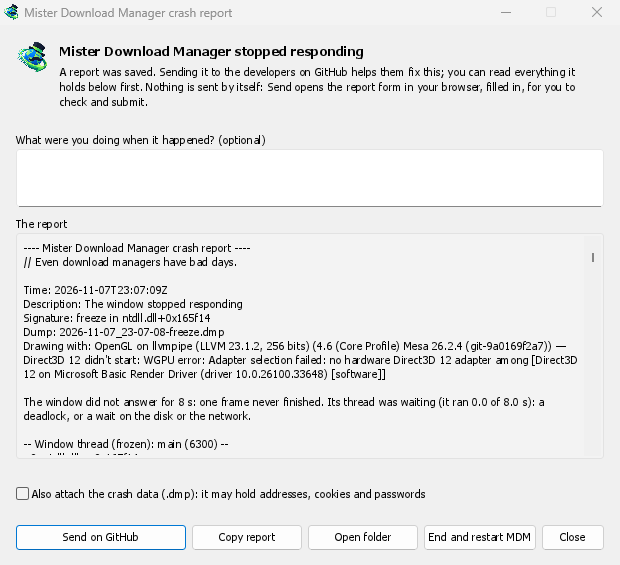
Wat u ziet
- Volt Download Manager closed unexpectedly: VDM crashed, or hit an internal error and closed.
- Volt Download Manager stopped responding: its window didn't answer for 8 seconds. VDM is still running, frozen. End and restart VDM closes the frozen copy and starts a new one. If VDM answers again by itself, the window says so.
In het venster:
- Wat deed u toen het gebeurde? is optioneel. Een paar woorden, zoals "Ik opende URL toevoegen", helpen enorm.
- Het rapport toont alles wat zou worden verzonden. Lees het eerst als u wilt.
- Verzenden op GitHub opent het Crashrapport-formulier van GitHub in uw browser, al ingevuld, samen met de map die het rapport bevat. Sleep het rapportbestand naar het formulier, controleer het en dien het in. U hebt een GitHub-account nodig. Er wordt niets vanzelf verzonden.
- Als iemand hetzelfde probleem al heeft gemeld, meldt het venster dat (Al gemeld als kwestie #…). De gemelde kwestie openen opent deze en plaatst uw rapport op het klembord, zodat u het als opmerking kunt toevoegen.
The other buttons copy the report, open its folder, or start VDM again.
Wat een rapport bevat
- What happened: the error and the place in VDM's code where it happened.
- The stack: the place in VDM's code where it crashed or froze, and what every other part of it was doing.
- VDM's recent log: for example "command AddUrl" or "window opened: add-url".
- The system: VDM's version and how you installed it, your operating system and its version, the processor, the language and theme, and how many downloads and queues you have. These are counts only.
Het bevat niet:
- uw downloadadressen of bestandsnamen;
- uw gebruikersnaam, die wordt weergegeven als
~in mappaden.
Als een foutmelding iets citeert dat u hebt getypt, staat die tekst in het rapport, dus lees het voordat u het verzendt.
The crash data file (.dmp) is a snapshot of what VDM was running at that moment. It helps the developers most, but it can hold pieces of what VDM had in memory, such as download addresses, cookies and saved passwords. It is only attached when you tick Also attach the crash data.
Waar rapporten worden bewaard
In VDM's data folder:
crashes\: elk rapport (.txt) en de crashgegevens ervan (.dmp);logs\: VDM's log (vdm.log, with older ones asvdm.1.logand so on, 2 MB each).
VDM's data folder is %APPDATA%\voltdownloadmanager on Windows, ~/Library/Application Support/voltdownloadmanager on macOS, and ~/.local/share/voltdownloadmanager on Linux. In portable mode it is the data folder next to the program.
The log records what VDM does, so a report can show what led to a problem. To log more detail, start VDM with the environment variable VDM_LOG=debug.
Voor ontwikkelaars
How it works: a second copy of VDM, the monitor, starts beside it with --crash-monitor. The crash code lives in crates/crash and crates/app/src/crash.rs.
- Catching problems. When VDM crashes (a Windows exception, a signal on Linux, a Mach exception on macOS), panics, or freezes, it asks the monitor for a dump. A freeze is a frame of the window running more than 8 s, seen by a watchdog thread that ignores time spent asleep and the first minute after the computer wakes, while its disk, network and screen come back: a stall then is written to the log, and reported only if it lasts past that minute. It times both parts of a frame: what VDM handles (the commands that come in, the clock of downloads, queues and the Scheduler), which runs minimized too, and the drawing; never the wait between frames, nor, on macOS, the time a system Open or Save dialog is open (macOS runs it on the window's thread, which waits there for your answer). The watchdog also measures how much processor time the window thread got meanwhile, and the report says what that means: it ran all along (a loop), it waited in a lock or on I/O (a deadlock), or it hardly ran in ordinary code, which is a computer too busy to run VDM or slow to load it from disk, most likely not VDM's bug (those share one signature,
freeze while the computer was busy). Each report also names what the frame was doing when it stopped (the tray icon, the downloads' progress, drawing the main window). When the window thread is already back in the event loop, or in the pause after a frame of a hidden window, by the time the dump is written, the freeze was over before the snapshot, so its stack can't explain it; those reports say so and share the signaturefreeze over before the snapshot. macOS doesn't measure it yet. The monitor then writes a minidump of every thread from outside, throughminidumperandcrash-handler. A crashed process never writes its own dump, which is how Firefox, Crashpad and Sentry do it too. - De dump lezen. De monitor leest de dump met Mozilla's
rust-minidump. Het gebruikt de Breakpad-symbolen van de release wanneer deze worden gevonden. Een build vanuit de bron kan ook de native debug-info ernaast lezen (zijn.pdb, DWARF) wanneer gebouwd met--features vdm-crash/native-symbols; de geleverde app wordt zonder die lezer, van enkele MB's, geleverd. De Handtekening van het rapport (bijvoorbeeldfreeze in voltdownloadmanager::winui::combo_edit) blijft hetzelfde voor rapporten van één probleem, en het venster zoekt er bestaande problemen mee. - Symbolen. Release-builds bewaren regeltabellen (
debug = "line-tables-only"), maar geen enkele download bevat de debug-informatie. CI zet deze om inVoltDownloadManager-<version>-symbols-<platform>.zip(één per download die eigen programma's heeft:windows-x64,windows-arm64,windows-x86,linux-x86_64,linux-arm64,macos-arm64,macos-x86_64) (tools/installer/symbols.py, met behulp van Mozilla'sdump_syms), gepubliceerd naast de andere bestanden van de release. Het rapportvenster haalt de zip op voor zijn eigen versie wanneer een stack kale adressen toont. - Een
.dmpvan een probleem:
cargo run -p vdm-crash --bin vdm-symbolicate -- crash.dmp VoltDownloadManager-<version>-symbols-windows-x64.zip
- Testing it.
cargo test -p vdm-crashruns a real freeze, panic and crash (examples/crashy.rs) and checks each report's signature. To try it in the app, start VDM withVDM_CRASH_TEST=1, then runvoltdownloadmanager /show crash-test:freeze(a deadlock; orspin, 12 s of a busy window thread,panic,crash,abort).cargo test -p vdm-app --test freeze_report -- --ignoreddoes that in a copy of the app off the screens, its window visible and minimized.
Gratis, open source, geen advertenties, geen proefversie.
Download Volt Download Manager