

If Volt Download Manager closes unexpectedly or stops responding, a crash report window opens. It shows what happened, lets you read the whole report, and can send it to the developers on GitHub. Each report helps fix the problem for everyone.
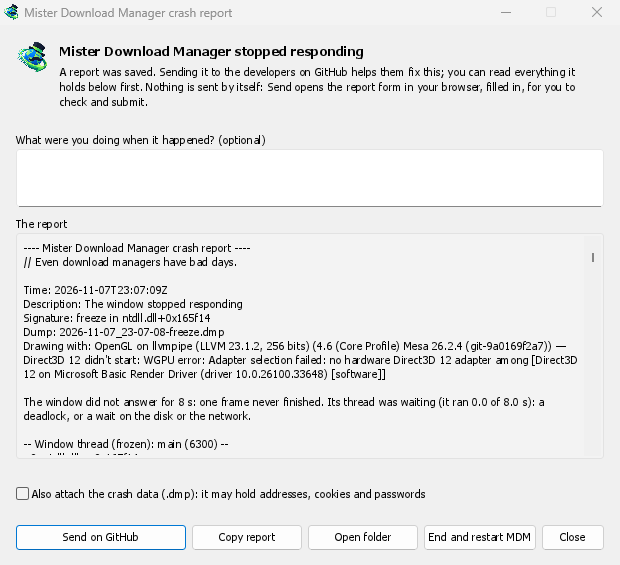
Co widzisz
- Volt Download Manager closed unexpectedly: VDM crashed, or hit an internal error and closed.
- Volt Download Manager stopped responding: its window didn't answer for 8 seconds. VDM is still running, frozen. End and restart VDM closes the frozen copy and starts a new one. If VDM answers again by itself, the window says so.
W oknie:
- Co robiłeś, gdy to się stało? jest opcjonalne. Kilka słów, takich jak „Otworzyłem Dodaj URL”, bardzo pomaga.
- Raport pokazuje wszystko, co zostanie wysłane. Przeczytaj go najpierw, jeśli chcesz.
- Wyślij na GitHub otwiera w przeglądarce formularz Raport o błędach na GitHub, już wypełniony, wraz z folderem zawierającym raport. Przeciągnij plik raportu do formularza, sprawdź go i wyślij. Potrzebujesz konta GitHub. Nic nie jest wysyłane automatycznie.
- Jeśli ktoś już zgłosił ten sam problem, okno to zasygnalizuje (Już zgłoszono jako problem #…). Otwórz zgłoszony problem otwiera go i umieszcza Twój raport w schowku, dzięki czemu możesz dodać go jako komentarz.
The other buttons copy the report, open its folder, or start VDM again.
Co zawiera raport
- What happened: the error and the place in VDM's code where it happened.
- The stack: the place in VDM's code where it crashed or froze, and what every other part of it was doing.
- VDM's recent log: for example "command AddUrl" or "window opened: add-url".
- The system: VDM's version and how you installed it, your operating system and its version, the processor, the language and theme, and how many downloads and queues you have. These are counts only.
Nie zawiera:
- adresów pobierania ani nazw plików;
- nazwy użytkownika, która w ścieżkach folderów jest wyświetlana jako
~.
Jeśli komunikat o błędzie cytuje coś, co wpisałeś, ten tekst znajduje się w raporcie, więc przeczytaj go przed wysłaniem.
The crash data file (.dmp) is a snapshot of what VDM was running at that moment. It helps the developers most, but it can hold pieces of what VDM had in memory, such as download addresses, cookies and saved passwords. It is only attached when you tick Also attach the crash data.
Gdzie przechowywane są raporty
In VDM's data folder:
crashes\: każdy raport (.txt) i jego dane awarii (.dmp);logs\: VDM's log (vdm.log, with older ones asvdm.1.logand so on, 2 MB each).
VDM's data folder is %APPDATA%\voltdownloadmanager on Windows, ~/Library/Application Support/voltdownloadmanager on macOS, and ~/.local/share/voltdownloadmanager on Linux. In portable mode it is the data folder next to the program.
The log records what VDM does, so a report can show what led to a problem. To log more detail, start VDM with the environment variable VDM_LOG=debug.
Dla programistów
How it works: a second copy of VDM, the monitor, starts beside it with --crash-monitor. The crash code lives in crates/crash and crates/app/src/crash.rs.
- Catching problems. When VDM crashes (a Windows exception, a signal on Linux, a Mach exception on macOS), panics, or freezes, it asks the monitor for a dump. A freeze is a frame of the window running more than 8 s, seen by a watchdog thread that ignores time spent asleep and the first minute after the computer wakes, while its disk, network and screen come back: a stall then is written to the log, and reported only if it lasts past that minute. It times both parts of a frame: what VDM handles (the commands that come in, the clock of downloads, queues and the Scheduler), which runs minimized too, and the drawing; never the wait between frames, nor, on macOS, the time a system Open or Save dialog is open (macOS runs it on the window's thread, which waits there for your answer). The watchdog also measures how much processor time the window thread got meanwhile, and the report says what that means: it ran all along (a loop), it waited in a lock or on I/O (a deadlock), or it hardly ran in ordinary code, which is a computer too busy to run VDM or slow to load it from disk, most likely not VDM's bug (those share one signature,
freeze while the computer was busy). Each report also names what the frame was doing when it stopped (the tray icon, the downloads' progress, drawing the main window). When the window thread is already back in the event loop, or in the pause after a frame of a hidden window, by the time the dump is written, the freeze was over before the snapshot, so its stack can't explain it; those reports say so and share the signaturefreeze over before the snapshot. macOS doesn't measure it yet. The monitor then writes a minidump of every thread from outside, throughminidumperandcrash-handler. A crashed process never writes its own dump, which is how Firefox, Crashpad and Sentry do it too. - Odczytywanie zrzutu. Monitor odczytuje zrzut za pomocą
rust-minidumpMozilli. Używa symboli Breakpad z wydania, jeśli je znajdzie. Kompilacja ze źródeł może również odczytywać natywne informacje debugowania (jej.pdb, DWARF), jeśli została zbudowana z--features vdm-crash/native-symbols; dostarczona aplikacja nie zawiera tego czytnika, który zajmuje kilka MB. Sygnatura raportu (na przykładfreeze in voltdownloadmanager::winui::combo_edit) pozostaje taka sama dla wszystkich raportów dotyczących jednego problemu, a okno wyszukuje istniejące zgłoszenia na jej podstawie. - Symbole. Kompilacje wydawnicze zachowują tabele linii (
debug = "line-tables-only"), ale żadne pobieranie nie zawiera informacji debugowania. CI przekształca je wVoltDownloadManager-<version>-symbols-<platform>.zip(jeden dla każdego pobierania, które ma własne programy:windows-x64,windows-arm64,windows-x86,linux-x86_64,linux-arm64,macos-arm64,macos-x86_64) (tools/installer/symbols.py, używającdump_symsMozilli), publikowane obok innych plików wydania. Okno raportu pobiera plik zip dla swojej wersji, gdy stos pokazuje surowe adresy. .dmpz problemu:
cargo run -p vdm-crash --bin vdm-symbolicate -- crash.dmp VoltDownloadManager-<version>-symbols-windows-x64.zip
- Testing it.
cargo test -p vdm-crashruns a real freeze, panic and crash (examples/crashy.rs) and checks each report's signature. To try it in the app, start VDM withVDM_CRASH_TEST=1, then runvoltdownloadmanager /show crash-test:freeze(a deadlock; orspin, 12 s of a busy window thread,panic,crash,abort).cargo test -p vdm-app --test freeze_report -- --ignoreddoes that in a copy of the app off the screens, its window visible and minimized.
Darmowy, open source, bez reklam, bez wersji próbnej.
Download Volt Download Manager