

If Volt Download Manager closes unexpectedly or stops responding, a crash report window opens. It shows what happened, lets you read the whole report, and can send it to the developers on GitHub. Each report helps fix the problem for everyone.
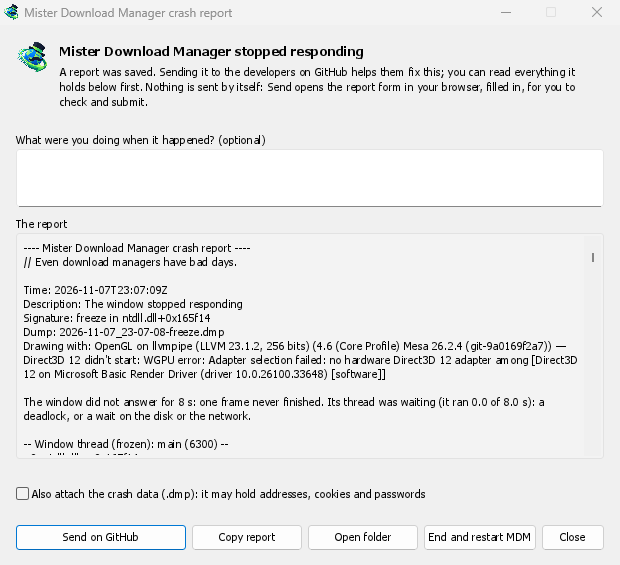
আপনি যা দেখেন
- Volt Download Manager closed unexpectedly: VDM crashed, or hit an internal error and closed.
- Volt Download Manager stopped responding: its window didn't answer for 8 seconds. VDM is still running, frozen. End and restart VDM closes the frozen copy and starts a new one. If VDM answers again by itself, the window says so.
উইন্ডোতে:
- যখন এটি ঘটেছিল তখন আপনি কী করছিলেন? ঐচ্ছিক। কিছু শব্দ, যেমন "আমি URL যোগ করুন খুলেছিলাম", অনেক সাহায্য করে।
- প্রতিবেদন যা কিছু পাঠানো হবে তা দেখায়। আপনি চাইলে প্রথমে এটি পড়ে নিতে পারেন।
- GitHub-এ পাঠান আপনার ব্রাউজারে GitHub-এর ক্র্যাশ রিপোর্ট ফর্মটি খোলে, যা আগে থেকেই পূরণ করা থাকে, এবং রিপোর্টের ফাইলটি যে ফোল্ডারে আছে সেটিও খোলে। রিপোর্টের ফাইলটি ফর্মে টেনে আনুন, এটি পরীক্ষা করুন এবং জমা দিন। আপনার একটি GitHub অ্যাকাউন্ট থাকা প্রয়োজন। নিজেই কিছু পাঠানো হয় না।
- যদি কেউ একই সমস্যা আগে থেকেই রিপোর্ট করে থাকে, তাহলে উইন্ডোটি তা জানায় (ইতিমধ্যে সমস্যা #… হিসাবে রিপোর্ট করা হয়েছে)। রিপোর্ট করা সমস্যাটি খুলুন এটি খোলে এবং আপনার রিপোর্টটি ক্লিপবোর্ডে রাখে, যাতে আপনি এটিকে একটি মন্তব্য হিসাবে যোগ করতে পারেন।
The other buttons copy the report, open its folder, or start VDM again.
একটি রিপোর্টে কী থাকে
- What happened: the error and the place in VDM's code where it happened.
- The stack: the place in VDM's code where it crashed or froze, and what every other part of it was doing.
- VDM's recent log: for example "command AddUrl" or "window opened: add-url".
- The system: VDM's version and how you installed it, your operating system and its version, the processor, the language and theme, and how many downloads and queues you have. These are counts only.
এতে থাকে না:
- আপনার ডাউনলোডের ঠিকানা বা ফাইলের নাম;
- আপনার ব্যবহারকারীর নাম, যা ফোল্ডার পাথে
~হিসাবে দেখানো হয়।
যদি একটি ত্রুটি বার্তা আপনার টাইপ করা কিছু উদ্ধৃত করে, তাহলে সেই লেখাটি রিপোর্টে থাকে, তাই পাঠানোর আগে এটি পড়ুন।
The crash data file (.dmp) is a snapshot of what VDM was running at that moment. It helps the developers most, but it can hold pieces of what VDM had in memory, such as download addresses, cookies and saved passwords. It is only attached when you tick Also attach the crash data.
রিপোর্ট কোথায় রাখা হয়
In VDM's data folder:
crashes\: প্রতিটি রিপোর্ট (.txt) এবং এর ক্র্যাশ ডেটা (.dmp);logs\: VDM's log (vdm.log, with older ones asvdm.1.logand so on, 2 MB each).
VDM's data folder is %APPDATA%\voltdownloadmanager on Windows, ~/Library/Application Support/voltdownloadmanager on macOS, and ~/.local/share/voltdownloadmanager on Linux. In portable mode it is the data folder next to the program.
The log records what VDM does, so a report can show what led to a problem. To log more detail, start VDM with the environment variable VDM_LOG=debug.
ডেভেলপারদের জন্য
How it works: a second copy of VDM, the monitor, starts beside it with --crash-monitor. The crash code lives in crates/crash and crates/app/src/crash.rs.
- Catching problems. When VDM crashes (a Windows exception, a signal on Linux, a Mach exception on macOS), panics, or freezes, it asks the monitor for a dump. A freeze is a frame of the window running more than 8 s, seen by a watchdog thread that ignores time spent asleep and the first minute after the computer wakes, while its disk, network and screen come back: a stall then is written to the log, and reported only if it lasts past that minute. It times both parts of a frame: what VDM handles (the commands that come in, the clock of downloads, queues and the Scheduler), which runs minimized too, and the drawing; never the wait between frames, nor, on macOS, the time a system Open or Save dialog is open (macOS runs it on the window's thread, which waits there for your answer). The watchdog also measures how much processor time the window thread got meanwhile, and the report says what that means: it ran all along (a loop), it waited in a lock or on I/O (a deadlock), or it hardly ran in ordinary code, which is a computer too busy to run VDM or slow to load it from disk, most likely not VDM's bug (those share one signature,
freeze while the computer was busy). Each report also names what the frame was doing when it stopped (the tray icon, the downloads' progress, drawing the main window). When the window thread is already back in the event loop, or in the pause after a frame of a hidden window, by the time the dump is written, the freeze was over before the snapshot, so its stack can't explain it; those reports say so and share the signaturefreeze over before the snapshot. macOS doesn't measure it yet. The monitor then writes a minidump of every thread from outside, throughminidumperandcrash-handler. A crashed process never writes its own dump, which is how Firefox, Crashpad and Sentry do it too. - ডাম্প পড়া। মনিটর মোজিলা-এর
rust-minidumpদিয়ে ডাম্প পড়ে। এটি রিলিজের ব্রেকপ্যাড সিম্বল ব্যবহার করে, যদি সেগুলো পাওয়া যায়। সোর্স থেকে তৈরি করা একটি বিল্ড এর সাথে থাকা নেটিভ ডিবাগ তথ্যও (এর.pdb, DWARF) পড়তে পারে, যদি--features vdm-crash/native-symbolsদিয়ে তৈরি করা হয়; শিপ করা অ্যাপটি সেই রিডার ছাড়া আসে, যা কয়েক MB। প্রতিবেদনের স্বাক্ষর (উদাহরণস্বরূপfreeze in voltdownloadmanager::winui::combo_edit) একটি সমস্যার একাধিক রিপোর্টে একই থাকে, এবং উইন্ডোটি এর জন্য বিদ্যমান সমস্যাগুলি অনুসন্ধান করে। - সিম্বল। রিলিজ বিল্ডগুলো লাইন টেবিল (
debug = "line-tables-only") রাখে, কিন্তু কোনো ডাউনলোডেই ডিবাগ তথ্য অন্তর্ভুক্ত থাকে না। CI এটিকেVoltDownloadManager-<version>-symbols-<platform>.zip-এ পরিণত করে (প্রতিটি ডাউনলোডের জন্য একটি করে যার নিজস্ব প্রোগ্রাম আছে:windows-x64,windows-arm64,windows-x86,linux-x86_64,linux-arm64,macos-arm64,macos-x86_64) (tools/installer/symbols.py, Mozilla-এরdump_symsব্যবহার করে), যা রিলিজের অন্যান্য ফাইলের পাশে প্রকাশিত হয়। যখন একটি স্ট্যাক খালি ঠিকানা দেখায়, তখন রিপোর্ট উইন্ডোটি তার নিজস্ব সংস্করণের জন্য জিপ ফাইলটি নিয়ে আসে। - একটি সমস্যা থেকে
.dmp:
cargo run -p vdm-crash --bin vdm-symbolicate -- crash.dmp VoltDownloadManager-<version>-symbols-windows-x64.zip
- Testing it.
cargo test -p vdm-crashruns a real freeze, panic and crash (examples/crashy.rs) and checks each report's signature. To try it in the app, start VDM withVDM_CRASH_TEST=1, then runvoltdownloadmanager /show crash-test:freeze(a deadlock; orspin, 12 s of a busy window thread,panic,crash,abort).cargo test -p vdm-app --test freeze_report -- --ignoreddoes that in a copy of the app off the screens, its window visible and minimized.
বিনামূল্যে, ওপেন সোর্স, কোনো বিজ্ঞাপন নেই, কোনো ট্রায়াল নেই।
Download Volt Download Manager