

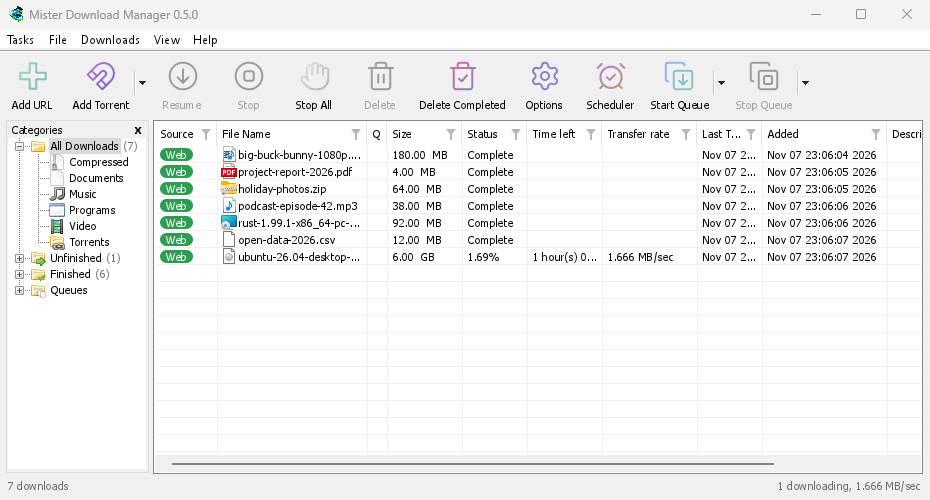
Volt Download Manager (VDM) is a free download manager for Windows and Linux (and, still experimental, macOS). It is laid out the way Internet Download Manager users expect: a toolbar, categories on the left, one list of downloads and a browser extension that hands downloads to it.
Halaman-halaman ini menjelaskan setiap bagian program. Tutorialnya memandu Anda melakukan hal-hal yang paling sering dilakukan, satu tugas setiap kali.
Mulai di sini
- Getting started — install VDM (setup, portable or zip on Windows; the packages on Linux; the .dmg on a Mac), choose a language and find your way around the main window.
- Unduhan pertama Anda — panduan dua menit dari tautan yang disalin hingga file dibuka.
Mengunduh
- Menambahkan unduhan — Tambah URL, papan klip, target lepas, unduhan massal dan daftar tautan, serta Mulai Unduhan versus Unduh Nanti.
- Link grabber dan arsip — banyak tautan sekaligus, dalam paket; arsip zip, 7z, dan rar diekstrak saat diunduh.
- Browser integration — the extension for Firefox (from addons.mozilla.org), Chrome, Edge, Brave, Opera, Vivaldi and Helium (from the Chrome Web Store), which downloads it takes, and what happens when VDM isn't running.
- Run VDM on a server — VDM without a window on a home server or NAS (Docker, Unraid), downloading into its folders; send it downloads from your phone or browser.
- Control VDM from your phone — add links, magnets and torrents from a phone or another computer at home, and watch and control the list.
Mengatur
- Daftar unduhan — kolom, filter, pohon kategori, memilih banyak unduhan, mencari unduhan, dan menghapus unduhan dengan atau tanpa filenya.
- Antrean dan Penjadwal — jalankan unduhan beberapa sekaligus, mulai dan hentikan sesuai waktu, dan matikan komputer setelah selesai.
Kecepatan dan koneksi
- Connections and speed — the progress window, how VDM splits a file over several connections, resuming, and the Speed Limiter.
Video dan torrent
- Unduhan video — unduh video dari halamannya (YouTube, Vimeo, dan banyak lagi) dengan yt-dlp.
- Galeri gambar — unduh gambar dari galeri (Wikimedia Commons, Flickr, DeviantArt, dan banyak lagi) dengan gallery-dl.
- Torrent — tautan magnet dan file .torrent, memilih file, dan berbagi.
- Torrent dan keamanan Anda — apa yang bisa dilihat orang lain, sakelar jaringan, daftar blokir, proksi.
- Akun layanan debrid — Real-Debrid, AllDebrid, Premiumize, TorBox, dan Mega-Debrid: tautan file-host melalui akun Anda sendiri.
Pengaturan
- Opsi — setiap halaman jendela Opsi.
- Tema — tampilan bawaan (Klasik, Sistem, Kontras tinggi, Metro, Adwaita, Breeze, Luna, Aero, Aqua, Emerald), dan cara membuat tema Anda sendiri dalam file teks.
- Bahasa — 87 bahasa antarmuka, angka dan tanggal, tata letak kanan-ke-kiri, dan cara membantu menerjemahkan.
- Portable mode — run VDM from a folder or a USB stick without installing it.
- Pintasan keyboard — setiap tombol yang direspons jendela utama, dan pembaca layar.
- Baris perintah dan otomatisasi — sakelar baris perintah IDM, alat
voltdownloadmanager-cli, dan API otomatisasi yang dapat digunakan program lain. - Asisten AI (MCP) — izinkan Claude, Cursor, VS Code, atau asisten MCP lainnya menampilkan, menambahkan, menjeda, dan menghapus unduhan Anda.
Tutorial
- Unduh file — salin tautan, tambahkan, buka file.
- Catch downloads from your browser — set up the extension so clicked downloads go to VDM.
- Unduh semalaman — antrekan file dan biarkan Penjadwal memulainya di malam hari.
- Lanjutkan unduhan yang terputus — lanjutkan setelah koneksi terputus, crash, atau tautan kedaluwarsa.
- Keep some speed for everything else — cap VDM so browsing and calls stay smooth.
- Unduh video dari halaman — pilih kualitas dan simpan video.
- Carry VDM on a USB stick — the portable copy, with downloads saved to the stick.
- Temukan unduhan dalam daftar panjang — Cari, Cari Berikutnya, dan filter kolom.
Bantuan
- Crash reports — what the crash report window shows when VDM closes unexpectedly or stops responding, what a report contains, and how to send it.
- Pemecahan masalah — apa yang harus diperiksa saat unduhan gagal, peramban tidak menyerahkan unduhan, atau jadwal tidak dimulai.
- The browser and VDM aren't connected — what the extension's red ! means, reason by reason, and how to fix each.
- Rilis — unduh versi terbaru.
- Rate VDM — one to five stars on the website's home or download page; pick again to change your rating, or remove it.
- Report a problem — or use Help → Report a problem in VDM, which fills in your version, system and how VDM was installed for you.
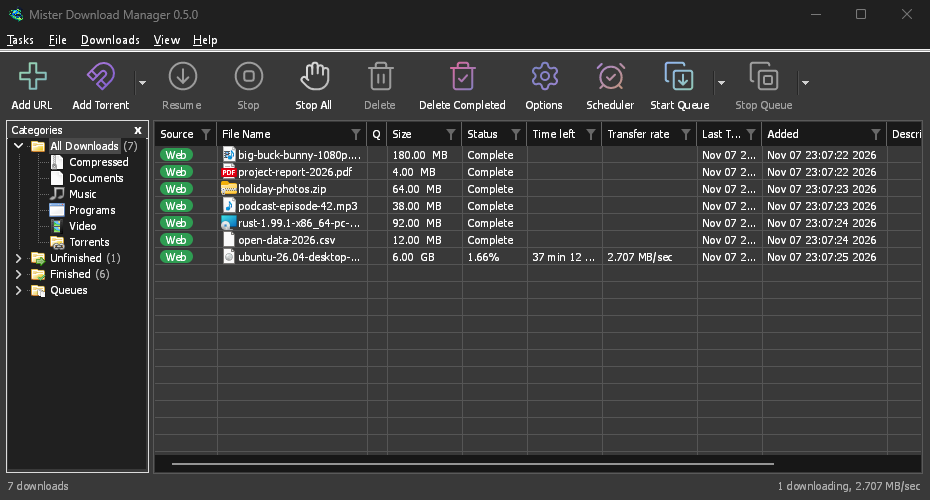
Screenshots in these docs show Windows and the light theme unless noted; on the website each has its dark version beside it. VDM follows the system's dark mode: when Windows (or your desktop) is set to dark, VDM is dark too.
Gratis, sumber terbuka, tanpa iklan, tanpa masa uji coba.
Download Volt Download Manager