

A download that stopped halfway doesn't have to start over. VDM keeps what it has and continues from there.
Setelah koneksi terputus
When the connection drops, VDM retries on its own. In the progress window, the connection table shows Retrying and the reason. Usually the download goes on by itself once the connection is back.
Jika VDM berhenti mencoba dan menampilkan Galat:
- Pilih unduhan dalam daftar.
- Klik Lanjutkan di bilah alat (atau klik kanan → Lanjutkan Unduhan).
Setelah aplikasi mengalami crash atau komputer dimulai ulang
VDM saves each download's progress as it goes, so a Windows crash, a power cut or closing VDM loses at most the last moments.
- Start VDM. The download is in the list under Unfinished.
- Pilih unduhan tersebut dan klik Lanjutkan.
Saat tautan kedaluwarsa
Banyak situs memberikan tautan yang hanya berfungsi untuk sementara atau hanya saat Anda masuk ke akun. Unduhan tidak dapat dilanjutkan karena alamat lama tidak lagi merespons.
- Klik kanan unduhan dan pilih Segarkan alamat unduhan.
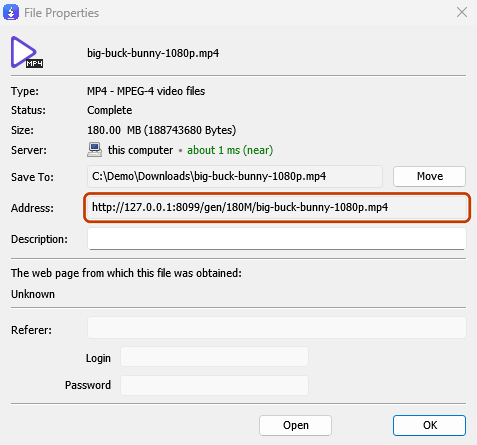
- VDM opens the web page the link came from (when it knows it), and the download's File Properties. For a download the browser handed over, that's the page you started it from; for an older one, the address the browser sent with it (often only the site's home page).
- On the web page, start the download again. When the browser hands it to VDM, VDM sees it's the same file (from the same site, with the same name, and the same size when both are known) and gives its address to the waiting download, which continues from where it stopped. There's nothing more to do.
- Atau salin tautan unduhan baru (klik kanan → Salin tautan), tempelkan ke Alamat di Properti File, klik OK, lalu klik Lanjutkan.
A Rapidgator download that stopped because its link expired or was refused waits for a new address the same way, without Refresh download address: starting the download again in the browser is enough. For other sites, choose Refresh download address first. Only a download the browser hands over by itself gives its address to a waiting one: not Download with VDM from the right-click menu, the command line or a script, and never a private window's download, or a private window's waiting one. For Rapidgator, VDM asks the file's page you started the download from for a fresh link by itself, with your browser's sign-in, and goes on without stopping. LuluStream's links expire too: a download added with the video's own link (its watch page or player) gets a fresh one from that link by itself, and one taken from the site's Download button gets it from the video's page you started it from.
The new address has to point at the same file. If it doesn't, VDM stops with the file changed on the server.
Saat file di server berubah
If the site replaced the file with a new version, the parts VDM has don't fit any more. Right-click the download and choose Redownload to start again from the beginning. A finished file is only replaced when the new download completes.
Jika unduhan tidak dapat dilanjutkan
Look at Resume capability in the progress window. No means the server can't send a file in parts. VDM then uses one connection, and a download that stops has to start over. For such servers, avoid stopping the download, and avoid a very low speed limit, which can make the server drop the connection.
Jika server seperti itu juga tidak mengirimkan ukuran (radio internet, umpan kamera), tombol jendela progres akan bertuliskan Hentikan dan pertahankan: ini adalah satu-satunya cara untuk menyimpan apa yang telah tiba, sebagai file yang selesai. Hentikan, Hentikan Semua, hentikan antrean, dan Batal tidak menyimpan apa pun. Lihat Unduhan yang tidak pernah berakhir.
Langkah selanjutnya
- Detail tentang koneksi dan melanjutkan unduhan →
- Pemecahan masalah →
- Kembali ke indeks dokumentasi →
Gratis, sumber terbuka, tanpa iklan, tanpa masa uji coba.
Download Volt Download Manager