

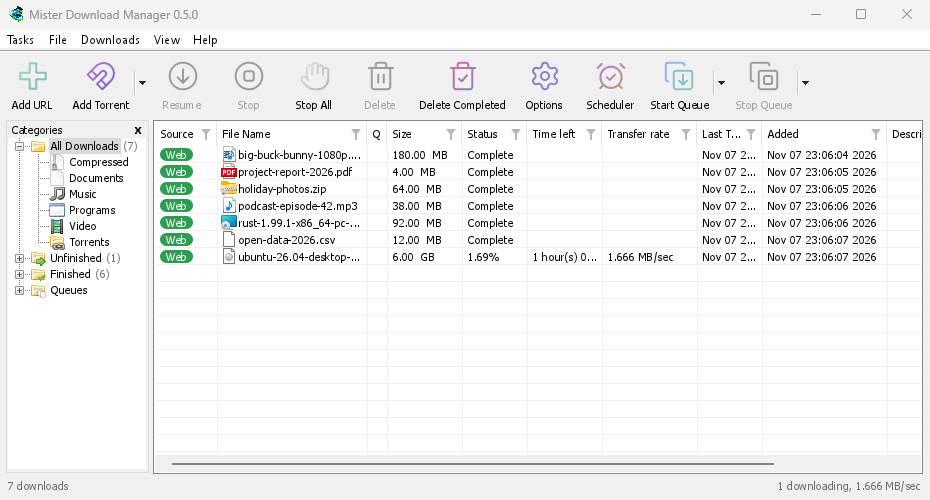
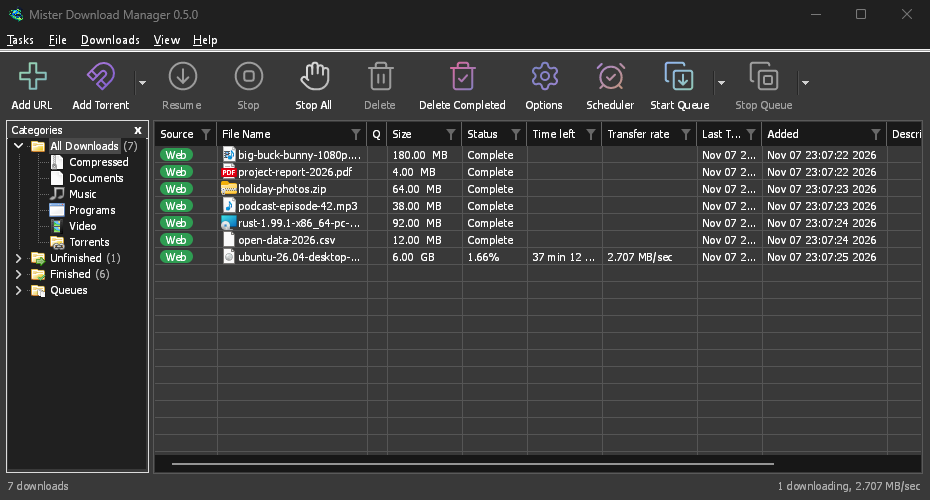
Volt Download Manager (VDM) is a free download manager for Windows and Linux (and, still experimental, macOS). It is laid out the way Internet Download Manager users expect: a toolbar, categories on the left, one list of downloads and a browser extension that hands downloads to it.
На этих страницах объясняется каждая часть программы. Руководства пошагово описывают наиболее частые действия, по одной задаче на каждое.
Начало работы
- Getting started — install VDM (setup, portable or zip on Windows; the packages on Linux; the .dmg on a Mac), choose a language and find your way around the main window.
- Ваша первая загрузка — двухминутное пошаговое руководство от скопированной ссылки до открытого файла.
Загрузка
- Добавление загрузок — «Добавить URL», буфер обмена, область перетаскивания, пакетные загрузки и списки ссылок, а также «Начать загрузку» против «Загрузить позже».
- Перехват ссылок и архивы — много ссылок сразу, пакетами; архивы zip, 7z и rar распаковываются после загрузки.
- Browser integration — the extension for Firefox (from addons.mozilla.org), Chrome, Edge, Brave, Opera, Vivaldi and Helium (from the Chrome Web Store), which downloads it takes, and what happens when VDM isn't running.
- Run VDM on a server — VDM without a window on a home server or NAS (Docker, Unraid), downloading into its folders; send it downloads from your phone or browser.
- Control VDM from your phone — add links, magnets and torrents from a phone or another computer at home, and watch and control the list.
Организация
- Список загрузок — столбцы, фильтры, дерево категорий, выбор нескольких загрузок, поиск одной и удаление загрузок с файлами или без них.
- Очереди и Планировщик — запуск загрузок по несколько штук одновременно, запуск и остановка по расписанию, а также выключение компьютера по завершении.
Скорость и соединения
- Connections and speed — the progress window, how VDM splits a file over several connections, resuming, and the Speed Limiter.
Видео и торренты
- Загрузка видео — загрузка видео со страницы (YouTube, Vimeo и многие другие) с помощью yt-dlp.
- Галереи изображений — загружайте изображения из галерей (Wikimedia Commons, Flickr, DeviantArt и многих других) с помощью gallery-dl.
- Торренты — magnet-ссылки и .torrent-файлы, выбор файлов и обмен.
- Торренты и ваша безопасность — что видят другие, сетевые переключатели, чёрные списки, прокси.
- Учетные записи службы дебрида — Real-Debrid, AllDebrid, Premiumize, TorBox и Mega-Debrid: ссылки на файлообменники через вашу учетную запись.
Настройки
- Параметры — каждая страница окна «Параметры».
- Темы — встроенные темы оформления (Классический, Системная, Высокая контрастность, Метро, Adwaita, Breeze, Luna, Aero, Aqua, Изумрудный) и как создать свою собственную в текстовом файле.
- Языки — 87 языков интерфейса, форматы чисел и дат, макеты с письмом справа налево и как помочь с переводом.
- Portable mode — run VDM from a folder or a USB stick without installing it.
- Сочетания клавиш — все клавиши, на которые реагирует главное окно, и программы чтения с экрана.
- Командная строка и автоматизация — параметры командной строки IDM, инструмент
voltdownloadmanager-cliи API автоматизации, который могут использовать другие программы. - ИИ-помощники (MCP) — позвольте Claude, Cursor, VS Code или другому MCP-помощнику просматривать, добавлять, приостанавливать и удалять ваши загрузки.
Руководства
- Загрузить файл — скопировать ссылку, добавить ее, открыть файл.
- Catch downloads from your browser — set up the extension so clicked downloads go to VDM.
- Загрузить ночью — поставить файлы в очередь и позволить Планировщику запустить их ночью.
- Возобновить прерванную загрузку — продолжить после обрыва соединения, сбоя или истекшей ссылки.
- Keep some speed for everything else — cap VDM so browsing and calls stay smooth.
- Загрузить видео со страницы — выбрать качество и сохранить видео.
- Carry VDM on a USB stick — the portable copy, with downloads saved to the stick.
- Найти загрузку в длинном списке — «Найти», «Найти далее» и фильтры столбцов.
Справка
- Crash reports — what the crash report window shows when VDM closes unexpectedly or stops responding, what a report contains, and how to send it.
- Устранение неполадок — что проверять, когда загрузка не удается, браузер не передает загрузку или расписание не запускается.
- The browser and VDM aren't connected — what the extension's red ! means, reason by reason, and how to fix each.
- Выпуски — загрузить последнюю версию.
- Rate VDM — one to five stars on the website's home or download page; pick again to change your rating, or remove it.
- Report a problem — or use Help → Report a problem in VDM, which fills in your version, system and how VDM was installed for you.
Screenshots in these docs show Windows and the light theme unless noted; on the website each has its dark version beside it. VDM follows the system's dark mode: when Windows (or your desktop) is set to dark, VDM is dark too.
Бесплатно, с открытым исходным кодом, без рекламы, без пробного периода.
Download Volt Download Manager