

Unpacked when it lands
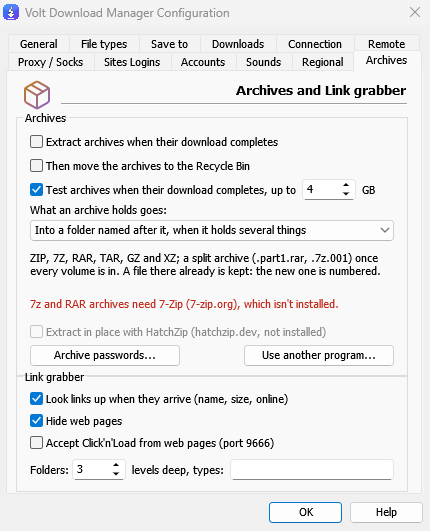
Tick Extract archives when their download completes in Options → Archives (it is off by
default), and every archive is extracted as soon as it is in. Or right-click a finished archive
and choose Extract. A split archive, such as movie.part1.rar and the parts after it, is
extracted once, when its last volume arrives.
The formats you meet
VDM itself extracts ZIP files, AES-encrypted and Deflate64 ones too, TAR, TAR.GZ and TAR.XZ archives, and single GZ and XZ files.
7z and RAR archives need 7-Zip, a free program. VDM uses it when it is installed, for split and encrypted archives too. Options → Archives says whether it was found; when it wasn't, the 7-Zip needed window says so, with a Get 7-Zip button. RAR's own extraction code can't be part of a free program like VDM, which is why it asks 7-Zip. With Extract in place with HatchZip on (below), HatchZip extracts them instead.
In place, for a nearly full disk
A 180 GB download that unpacks to 200 GB normally needs 380 GB: the archive and its files at once. With HatchZip, a free extractor, installed, tick Extract in place with HatchZip in Options → Archives: the archive shrinks as its files come out, so a little over 200 GB is enough. HatchZip checks that everything fits and that the password is right before it changes anything. If it stops partway, the files so far stay beside the archive and Extract continues.
Careful with your disk
The files go next to the archive, into a folder named after it when it holds several things (or
always, or never: you choose in Options). A file that is already there is kept, and the new one
is numbered: report (1).txt.
A name that would lead outside the folder is left out, and so is a link to somewhere else on the disk. An archive that would write far more than its size, or more than the disk has room for, stops before it fills it. Extracted files are marked as coming from the internet, as the archive is, so Windows still warns before running a program from them. The archive itself goes to the Recycle Bin (the Trash on macOS and Linux) only if you ask.
Packages that know their archives
In Link grabber, the volumes of one archive form one package. Each package has its folder, the archives' password, Extract when done (ticked by itself when the package holds an archive) and Delete archives after extracting. The password is kept in memory only: it is tried first when an archive needs one, and is never saved by itself.
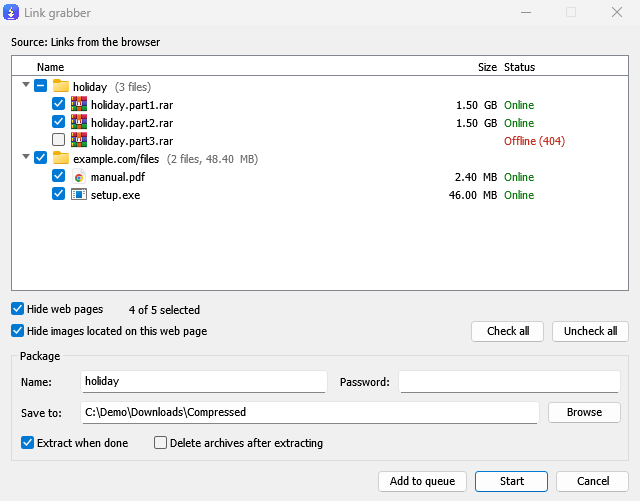
An encrypted archive is tried with its package's password and your saved passwords first (Options → Archives → Archive passwords..., the one that fits moving to the top; a package's password the archive needed joins them), and only then opens the Archive password window, which can remember what you type. 7-Zip gets each password on its input, never on its command line. Hover over the download in the list to read what happened: how many files were extracted and where, or why not.
Free, open source, no ads, no trial.
Download Volt Download Manager