

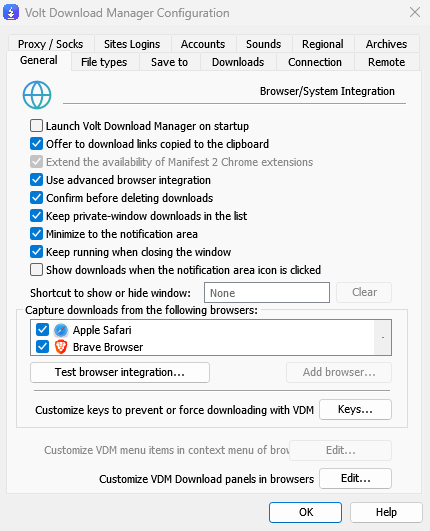
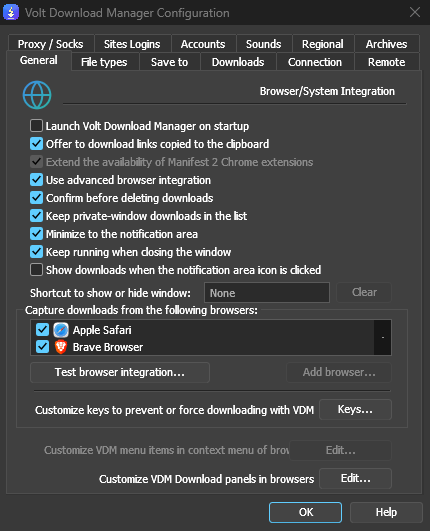
Khởi động cùng máy tính, không hiển thị ra trước
Tick Launch Volt Download Manager on startup in Options → General and VDM starts when you sign in, hidden, its icon in the notification area. Its downloads, queues, the Scheduler and downloads from the browser all run from there. Click the icon, or start VDM again, and the window opens as usual.
The option is off until you tick it. On Linux and macOS VDM starts with your session the same way. A portable copy can't start with Windows, since that needs the registry, so the option is greyed there.
Một cú nhấp chuột ẩn cửa sổ tải xuống
Cửa sổ tiến trình tải xuống có nút Ẩn vào vùng thông báo: một dấu gạch ngang ngắn với mũi tên chỉ xuống góc. Trên Windows, nó nằm ở thanh tiêu đề, bên trái nút Thu nhỏ, và trong menu của thanh tiêu đề (Alt+Space). Trên Linux và macOS, nó nằm ở cuối hàng tab. Quá trình tải xuống vẫn tiếp tục.
Để xem lại, nhấp chuột phải vào biểu tượng khay và chọn nó trong mục Đang tải xuống, nơi liệt kê mọi lượt tải xuống đang chạy. Nhấp đúp vào lượt tải xuống trong danh sách cũng sẽ đưa cửa sổ của nó trở lại.
Thu nhỏ cũng gửi cửa sổ vào khay
With Minimize to the notification area on in Options → General (it is on by default), Minimize hides the main window, and a progress window, in the notification area instead of leaving them on the taskbar. Closing the main window does the same: VDM keeps running until you choose Tasks → Exit or Exit in the tray menu.
Menu khay hệ thống cũng có Thêm tải xuống mới, Thêm tải xuống hàng loạt, Thêm tải xuống hàng loạt từ bảng tạm, Giới hạn tốc độ, Bộ lập lịch, hàng đợi tải xuống chính và Tùy chọn.
Không làm phiền khi bạn chơi game hoặc thuyết trình
While a full-screen game, a film or a presentation is on, or the screen is locked, Download complete and VDM's other windows that come up by themselves wait. The download finishes as usual; its window shows when you're back, and several show one after the other, in the order they came. The tray icon's tip says how many wait. A link you click in the browser still opens at once. To have them show at once anyway, untick Don't show pop-ups while a full-screen app or presentation is running in Options → Downloads.
Nhẹ nhàng khi chờ
Hidden in the notification area, VDM hands the memory it isn't using back to the system. Task Manager's Memory for VDM drops from about 50 MB to under 10 MB there, and VDM gives memory back again every 10 minutes while it stays hidden. On Linux it does the same with its free memory.
Khi không có khay
All of this needs a notification area that shows VDM's icon. Windows and macOS have one, and so do most Linux desktops (KDE, GNOME with its AppIndicator extension, waybar's tray). On a desktop without one, VDM starts minimized instead, closing the window quits VDM, and Minimize to the notification area is greyed. In a Wayland session the main window stays minimized in the dock, because Wayland can't hide a window.
Miễn phí, mã nguồn mở, không quảng cáo, không dùng thử.
Download Volt Download Manager